
Fanless box PC · CAN bus on an 8-pin Phoenix terminal block
UPC-206E CAN Bus Fanless Industrial Box PC
CAN bus (8-pin Phoenix) · 3× COM + 2× RS485 · 6× USB · Dual LAN · 195 × 160 × 42.8 mm · 1.7 kg · Fanless
A CAN bus interface on an 8-pin Phoenix terminal block is what the UPC-206E is built around — CANH and CANL land on a screw terminal, so the unit drops straight onto an existing CAN network instead of needing a USB-to-CAN adapter. It is a fanless aluminium box PC for factory automation, smart manufacturing, industrial robotics, automotive test rigs and elevator control, where devices have to exchange data in real time. With 3× RS232 plus 2× optional RS485, dual Intel I211 Gigabit LAN and dual display, it covers the rest of the cabinet at 195 × 160 × 42.8 mm and 1.7 kg.

CAN bus on Phoenix terminal3× RS2322× RS485 optional6× USBDual Intel I211 LAN1.7 kg
17+
Years
50+
Countries
1
MOQ unit
2–4
Weeks lead
OEM
ODM & branding
At a glance
UPC-206E key specifications
Everything that decides whether this box fits your cabinet — I/O count, processor ladder, memory and storage, and the environment it holds.
Processor
Intel® Celeron® J1900 (J6412 / 12th Gen Core platform options)
Memory
4–8GB DDR3L
Storage
1× mSATA SSD
CAN bus
1× CAN on an 8-pin Phoenix terminal block
Serial
3× RS232 (DB9) + 2× RS485 optional
USB
5× USB 2.0 + 1× USB 3.0 (Type-A)
Ethernet
2× Intel I211 10/100/1000M Gigabit LAN
Display
1× HDMI + 1× VGA
Cooling
Fanless — no fan, no filter
Operating temperature
0–50 ℃ (−40–70 ℃ optional)
Dimensions
195 × 160 × 42.8 mm
Mounting
Bracket mount / VESA mount
Design notes
Why the CAN interface belongs inside the box PC

CAN on a screw terminal, not an adapter
The UPC-206E carries the CAN interface on an 8-pin Phoenix terminal block, with CANH and CANL presented as screw terminals. That is the difference between a box PC that joins a CAN network and one that needs a USB-to-CAN dongle hanging out of the front: the field bus lands on the same terminal style the rest of the cabinet uses, and the connection survives vibration and cabinet servicing. It is the arrangement factory automation, robot cells and vehicle test benches expect.
- 8-pin Phoenix terminal block — CANH / CANL on screw terminals
- No USB-to-CAN adapter to mount, power or lose
- Can coexist with the machine bus instead of replacing it
- Real-time device-to-device communication on an existing CAN network
- Same terminal style as the rest of the control cabinet
A 42.8 mm chassis that fits where a box PC will not
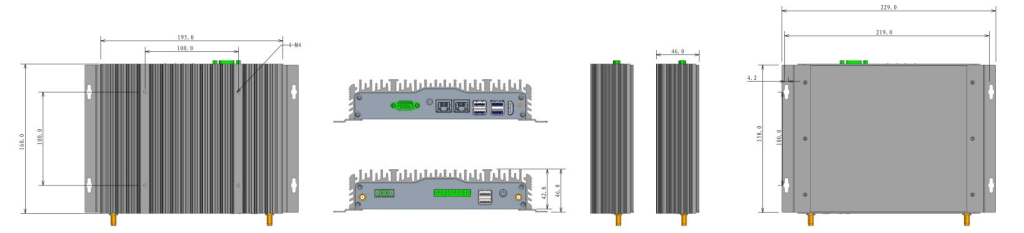
At 195 × 160 × 42.8 mm and 1.7 kg the UPC-206E is one of the smallest units in the family, and it is built from 6063 high-strength aluminium extrusion with no fan and no filter. The 229 × 160 × 46 mm cutout means it can also be set into a panel opening rather than only bracket-mounted, which matters in elevator control rooms and machine cabinets where the depth budget is already spent.
- 195 × 160 × 42.8 mm overall, 1.7 kg
- 229 × 160 × 46 mm cutout for panel mounting
- 6063 aluminium extrusion plus sheet metal, fanless by construction
- Bracket mount and VESA mount
- 0–50 ℃ standard, −40–70 ℃ optional

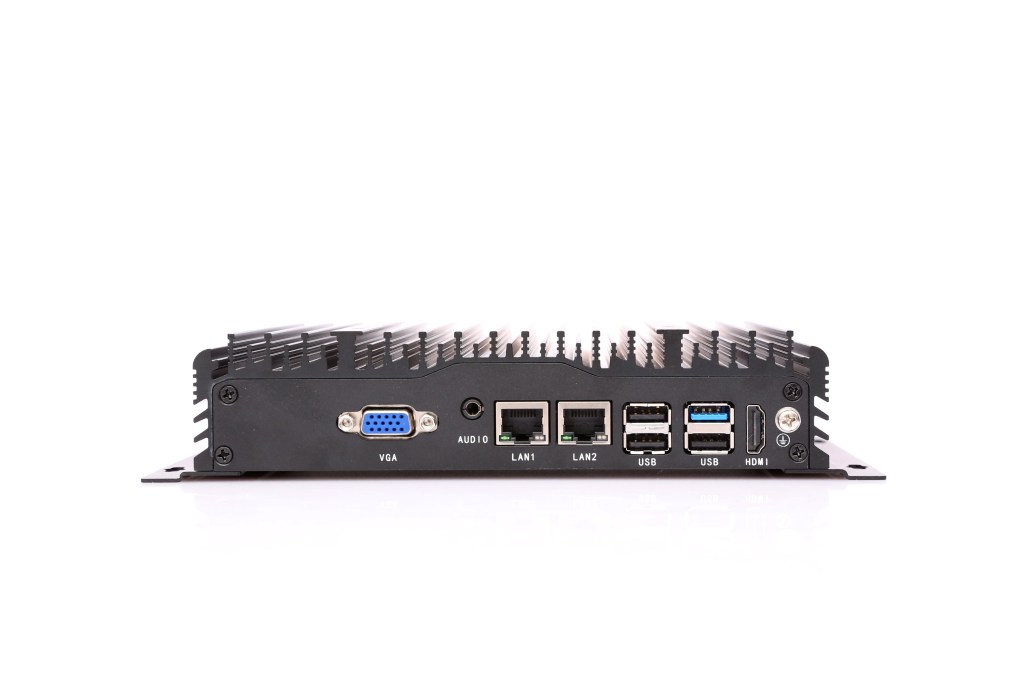
The I/O a CAN node still needs
A device that talks CAN usually still has to handle everything else in the cabinet. The UPC-206E carries 3× RS232 on DB9 plus 2× optional RS485, 6× USB, dual Intel I211 Gigabit LAN, HDMI + VGA for two independent displays, and Mic-in plus Line-out audio. Power is 12V DC on a 3-pin Phoenix connector with 9–36V DC available as an option, and startup is switchable between AT and ATX for unattended cabinets.
- 3× RS232 and 2× optional RS485 alongside the CAN port
- 2× Intel I211 Gigabit LAN — the industrial controller used across the range
- HDMI 1920×1200 + VGA 1920×1200 dual display
- 12V DC 3-pin Phoenix, 9–36V DC optional
- MTBF 60,000 hours, ISO 9001:2015 factory, ODM branding available
Configurations
Choose the UPC-206E configuration
One standard build plus two platform CPU options. The CAN interface, the serial and USB mix, the enclosure and the mounting — 1× CAN bus (8-pin Phoenix, CANH / CANL) · 3× RS232 + 2× RS485 · 5× USB 2.0 + 1× USB 3.0 · HDMI + VGA · dual Intel I211 Gigabit LAN — are the same whichever processor is fitted.
Intel® Celeron® J1900
Standard · Celeron J1900
Best forCAN bus polling and data-logging nodes, and legacy Windows 7 machine controllers being re-panelled, where the box only has to read the bus and forward the frames.
Part number C8.02.01.009 — standard build: 4GB memory, SSD 128GB.
System core
| Processor | Intel® Celeron® J1900 |
| Memory | 4GB (4–8GB DDR3L) |
| Storage | SSD 128GB |
| Storage slots | 2.0–2.42 GHz (J1900) |
| Cooling | 2 MB |
| Operating system | 10 W |
Fieldbus & interfaces
| CAN bus | 1× CAN interface on an 8-pin Phoenix terminal block (CANH / CANL) |
| USB | 5× USB 2.0 + 1× USB 3.0 (Type-A) |
| COM | 3× RS232 (DB9) + 2× RS485 (optional) |
| Display | 1× HDMI (1920×1200 @30Hz) + 1× VGA (1920×1200) |
| Audio | 1× Mic-in + 1× Line-out |
| Ethernet | 2× Intel I211 10/100/1000M Gigabit LAN |
Wireless & expansion
| Wi-Fi | Intel N6235 300 Mbps, 802.11a/b/g/n, 2.4G / 5G, 2×2 antenna |
| Wireless network | 4G LTE full netcom module (optional) |
Power
| DC input | 1× 3-pin Phoenix terminal block, 12V DC (9–36V DC optional) |
| Power button | 1× ATX power on/off button (rear) |
| Booting | 1× AT/ATX mode switch (internal) |
Environmental
| Operating temperature | 0–50 ℃ (−40–70 ℃ optional) |
| Storage temperature | −10–60 ℃ |
| Relative humidity | 10%–90%, non-condensing |
| EMC | CE, FCC (EN 55032 & EN 55035), EN IEC 61000-3-2 |
| Factory | ISO 9001:2015 |
| MTBF | 60,000 hours |
Mechanical
| Dimension | 195 (W) × 160 (D) × 42.8 (H) mm |
| Cutout size | 229 (W) × 160 (D) × 46 (H) mm |
| Weight | 1.7 KG N.W. |
| Material | 6063 high-strength aluminium alloy |
| Construction | Aluminium extrusion + sheet metal |
| Mounting | Bracket mount / VESA mount |
Compliance & ODM
| Certifications | CE / FCC, according to EN 55032 & EN 55035 |
| ODM | BIOS / Boot on LOGO / OEM |
Intel® Celeron® J6412
Platform option · Celeron J6412
Best forCurrent Windows 10 / 11 CAN gateways that need DDR4 and a modern Celeron, but still no Core-class compute.
Part number issued per configuration — this build is a platform CPU option; CPU model may vary, contact sales for the exact part number.
System core
| Processor | Intel® Celeron® J6412 |
| Memory | 8GB (configured per order) |
| Storage | SSD 256GB |
| Storage slots | 2.0–2.42 GHz (J1900) |
| Cooling | 2 MB |
| Operating system | 10 W |
Fieldbus & interfaces
| CAN bus | 1× CAN interface on an 8-pin Phoenix terminal block (CANH / CANL) |
| USB | 5× USB 2.0 + 1× USB 3.0 (Type-A) |
| COM | 3× RS232 (DB9) + 2× RS485 (optional) |
| Display | 1× HDMI (1920×1200 @30Hz) + 1× VGA (1920×1200) |
| Audio | 1× Mic-in + 1× Line-out |
| Ethernet | 2× Intel I211 10/100/1000M Gigabit LAN |
Wireless & expansion
| Wi-Fi | Intel N6235 300 Mbps, 802.11a/b/g/n, 2.4G / 5G, 2×2 antenna |
| Wireless network | 4G LTE full netcom module (optional) |
Power
| DC input | 1× 3-pin Phoenix terminal block, 12V DC (9–36V DC optional) |
| Power button | 1× ATX power on/off button (rear) |
| Booting | 1× AT/ATX mode switch (internal) |
Environmental
| Operating temperature | 0–50 ℃ (−40–70 ℃ optional) |
| Storage temperature | −10–60 ℃ |
| Relative humidity | 10%–90%, non-condensing |
| EMC | CE, FCC (EN 55032 & EN 55035), EN IEC 61000-3-2 |
| Factory | ISO 9001:2015 |
| MTBF | 60,000 hours |
Mechanical
| Dimension | 195 (W) × 160 (D) × 42.8 (H) mm |
| Cutout size | 229 (W) × 160 (D) × 46 (H) mm |
| Weight | 1.7 KG N.W. |
| Material | 6063 high-strength aluminium alloy |
| Construction | Aluminium extrusion + sheet metal |
| Mounting | Bracket mount / VESA mount |
Compliance & ODM
| Certifications | CE / FCC, according to EN 55032 & EN 55035 |
| ODM | BIOS / Boot on LOGO / OEM |
Intel® Core™ i3-1215U
Platform option · 12th Gen Core
Best forCAN bus filtering, protocol conversion and a local HMI or MES client running on the same box as the bus interface.
Part number issued per configuration — this build is a platform CPU option; CPU model may vary, contact sales for the exact part number.
System core
| Processor | Intel® Core™ i3-1215U |
| Memory | 8GB (configured per order) |
| Storage | SSD 256GB |
| Storage slots | 2.0–2.42 GHz (J1900) |
| Cooling | 2 MB |
| Operating system | 10 W |
Fieldbus & interfaces
| CAN bus | 1× CAN interface on an 8-pin Phoenix terminal block (CANH / CANL) |
| USB | 5× USB 2.0 + 1× USB 3.0 (Type-A) |
| COM | 3× RS232 (DB9) + 2× RS485 (optional) |
| Display | 1× HDMI (1920×1200 @30Hz) + 1× VGA (1920×1200) |
| Audio | 1× Mic-in + 1× Line-out |
| Ethernet | 2× Intel I211 10/100/1000M Gigabit LAN |
Wireless & expansion
| Wi-Fi | Intel N6235 300 Mbps, 802.11a/b/g/n, 2.4G / 5G, 2×2 antenna |
| Wireless network | 4G LTE full netcom module (optional) |
Power
| DC input | 1× 3-pin Phoenix terminal block, 12V DC (9–36V DC optional) |
| Power button | 1× ATX power on/off button (rear) |
| Booting | 1× AT/ATX mode switch (internal) |
Environmental
| Operating temperature | 0–50 ℃ (−40–70 ℃ optional) |
| Storage temperature | −10–60 ℃ |
| Relative humidity | 10%–90%, non-condensing |
| EMC | CE, FCC (EN 55032 & EN 55035), EN IEC 61000-3-2 |
| Factory | ISO 9001:2015 |
| MTBF | 60,000 hours |
Mechanical
| Dimension | 195 (W) × 160 (D) × 42.8 (H) mm |
| Cutout size | 229 (W) × 160 (D) × 46 (H) mm |
| Weight | 1.7 KG N.W. |
| Material | 6063 high-strength aluminium alloy |
| Construction | Aluminium extrusion + sheet metal |
| Mounting | Bracket mount / VESA mount |
Compliance & ODM
| Certifications | CE / FCC, according to EN 55032 & EN 55035 |
| ODM | BIOS / Boot on LOGO / OEM |
Drawings
Dimensions and certifications
Check the depth against your cabinet before ordering — at 42.8 mm the UPC-206E fits back plates where a standard box PC will not.

Ordering information
Part numbers and standard builds
Each row is a complete factory build: the part number fixes processor, memory and storage. The enclosure, the mounting and the full I/O set — 1× CAN bus (8-pin Phoenix, CANH / CANL) · 3× RS232 + 2× RS485 · 5× USB 2.0 + 1× USB 3.0 · HDMI + VGA · dual Intel I211 Gigabit LAN — are the same for every row.
| NO. | Model | Product Part Number | Description | Standard Memory | Standard Storage |
|---|---|---|---|---|---|
| 1 | UPC-206E | C8.02.01.009 | Intel® Celeron® J1900 Processor | 4GB | SSD 128GB |
| 2 | UPC-206E | On request | Intel® Celeron® J6412 Processor | 8GB | SSD 256GB |
| 3 | UPC-206E | On request | Intel® Core™ i3-1215U Processor | 8GB | SSD 256GB |
Contact sales for volume pricing, memory and storage upgrades, the −40–70 ℃ extended temperature build, and 4G / Wi-Fi configuration on the same part numbers. Rows marked On request are platform CPU options: the processor family is published without a part number, so the number is issued per configuration — CPU model may vary.
Downloads
UPC-206E downloads
The full specification is available immediately. Manuals, drivers, certificates and drawings are issued with the quotation.
UPC-206E datasheet
Full specifications, I/O layout, dimensions and the ordering table (PDF).
Panel PC buying guide
How to size the display, choose the protection rating and specify the cutout.
Industrial PC FAQ
Processor, operating system, mounting and environmental questions.
Manual, drivers & certificates
User manual, driver pack, CE / FCC / BIS certificates, 2D and 3D drawings — issued per order.
FAQ
UPC-206E frequently asked questions
Questions about the CAN interface and its terminal block, the Celeron J1900 build, the platform CPU options, Windows 7 support and the mechanical fit.
What is the UPC-206E, and what makes it different from a standard box PC?
The UPC-206E is a fanless industrial box PC with a CAN bus interface built in. Standard box PCs talk Ethernet, USB and serial; a CAN device — a robot controller, a vehicle ECU, an elevator controller, a CAN-based sensor — cannot be attached to them without a USB-to-CAN adapter. The UPC-206E puts the CAN interface on the same board set as the processor, with CANH and CANL brought out to an 8-pin Phoenix terminal block.
How is the CAN interface wired?
Through an 8-pin Phoenix terminal block, with CANH and CANL as screw terminals. That is the same terminal style used for the rest of the cabinet, so the bus wiring lands on a screw connection rather than a plug-in adapter. It also means the CAN connection is a permanent part of the chassis instead of a dongle that can be unplugged, lost or vibrate loose.
Which applications is a CAN box PC actually used for?
The usual ones are factory automation and smart manufacturing cells where PLCs, drives and remote I/O talk CAN; industrial robotics, where the robot controller exposes a CAN bus; automotive test rigs, which are CAN networks by definition; and elevator control, where the car and landing controllers sit on a CAN bus. In each case the box PC both joins the CAN network and runs the software that consumes the data.
Does it still have enough serial and network ports for the rest of the cabinet?
Yes — 3× RS232 on DB9 plus 2× optional RS485, 2× Intel I211 Gigabit LAN, 5× USB 2.0 + 1× USB 3.0, HDMI 1920×1200 and VGA 1920×1200 for dual display, and Mic-in plus Line-out audio. A CAN node usually still has to talk to a scanner, an indicator and the plant network at the same time, and this chassis covers all of it without a second box.
What are the dimensions and weight, and can it be panel-mounted?
195 (W) × 160 (D) × 42.8 (H) mm overall and 1.7 kg N.W., in 6063 high-strength aluminium extrusion with sheet metal. There is also a 229 × 160 × 46 mm cutout, so it can be set into a panel opening as well as bracket or VESA mounted. At 42.8 mm deep it goes into cabinets where a standard box PC plus its clearance will not.
Which processor does the CAN box PC use, and how many builds are there?
The base build is an Intel® Celeron® J1900, a 4-core 2.0–2.42 GHz part at 10 W TDP. The platform also supports Celeron J6412 and 10th / 12th Gen Core processors, and three factory builds are orderable: C10.03.12.001 with 8GB, C10.03.12.002 and C10.03.12.003 with the higher tiers and 16GB. Memory and storage follow the tier — from DDR3L 4–8GB with an mSATA SSD on J1900.
How is the CAN box PC cooled, and what environment does it hold?
It is completely fanless: no fan, no filter, and no air path pulling conductive dust or oil mist across the boards. Operating temperature is 0–50 ℃ as standard with −40–70 ℃ optional, storage is −10–60 ℃, humidity is 10%–90% non-condensing, and the MTBF rating is 60,000 hours.
What power input does it need, and how does it start up?
12V DC through a 3-pin Phoenix terminal block, with 9–36V DC available as an option — worth specifying for vehicles, battery-backed systems and unstable plant supplies. There is a rear ATX power button and an internal AT/ATX mode switch, so an unattended unit can be configured to resume automatically when power returns.
What certifications and customisation does it carry?
CE and FCC to EN 55032 and EN 55035, plus EN IEC 61000-3-2, from an ISO 9001:2015 factory. ODM covers custom BIOS, boot-on-LOGO and OEM branding on the same chassis. It runs Windows 7, Windows 10 / 11 and Linux Ubuntu 16.04–22.04 — Windows 7 support on the J1900 build matters when a CAN node is replacing legacy machine software.
Related models
Other models in the family
The LEGO MODE box PC family covers digital I/O and fieldbus, serial and USB, multi-LAN, cellular and power-redundant variants on one modular platform. The UPC-206E is the one built around a CAN bus interface; if you need more LAN ports, 8×8 digital I/O, battery backup, redundant power or a SIM-card slot, one of its siblings carries it.
Tell us your I/O list and your cabinet space
Send us the signals you need to read and drive, the ports, the supply voltage and the space available. We will confirm the configuration, the part number, the lead time and the price — typically the same working day.
Request a quotation
Tell us what you need — we will quote the UPC-206E
Pick the specification and the application below — every answer reaches us as a separate line, so one reply can confirm the exact build, lead time and price. Not sure about a field? Leave it on “advise me” and our engineers will choose for you.

