
Industrial box PC · 14× USB · dual display · airport kiosk and counter fleets
UPC-302F Fourteen USB Ports for Kiosk Fleets — Fanless Industrial Box PC
14× USB (10× 2.0 + 4× 3.0) · 3× RS232 + 1× RS485 · Dual Intel I210 LAN · 337 × 160 × 47.5 mm · 3.7 kg · Fanless
Fourteen USB ports is more than any other box in this family, and it is the number a self-service kiosk actually needs: a passport or document reader, a boarding-pass or receipt printer, a camera, a signature pad, a card reader, an RFID reader, a barcode scanner, a status display, a service keyboard — and that is before the spares. The UPC-302F puts 10× USB 2.0 and 4× USB 3.0 on one fanless chassis along with HDMI + VGA for the passenger and operator side, 3× RS232 plus 1× RS485 for readers that stayed serial, and dual Intel I210 LAN.
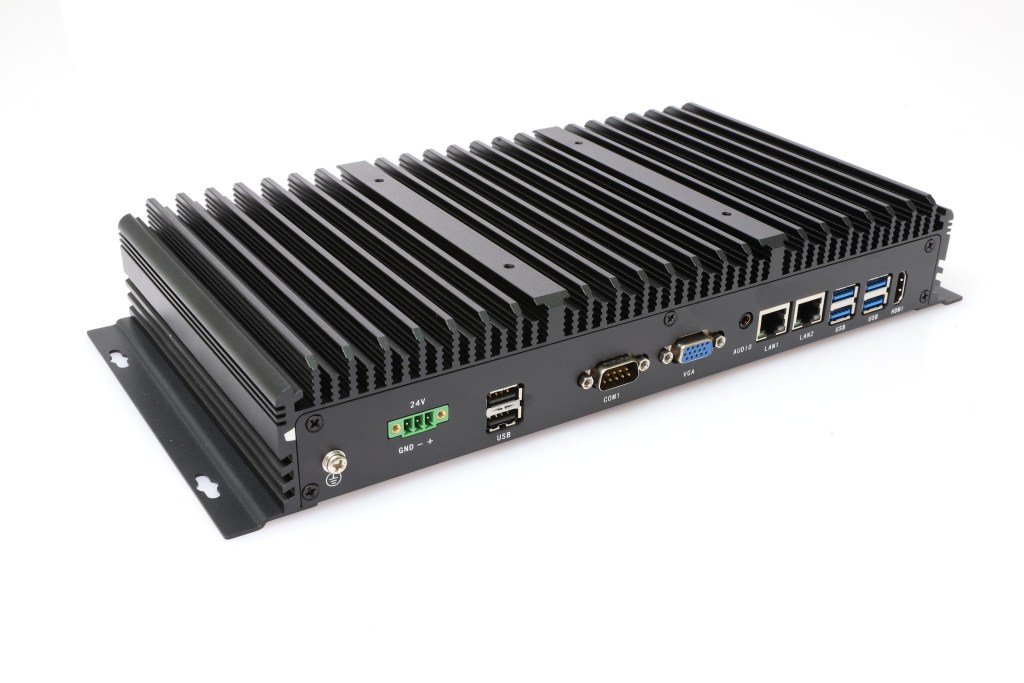
14× USB Type-A10× USB 2.04× USB 3.0Dual HDMI + VGA3× RS232 + 1× RS485Dual Intel I210 LAN
17+
Years
50+
Countries
1
MOQ unit
2–4
Weeks lead
OEM
ODM & branding
At a glance
UPC-302F key specifications
Everything that decides whether this box fits your cabinet — I/O count, processor ladder, memory and storage, and the environment it holds.
Processor
Intel® Core™ 12th Gen i3-1215U (i5-1235U / i7-1255U optional)
Memory
DDR5 8–32GB
Storage
1× mSATA SSD
USB
14× USB Type-A (10× USB 2.0 + 4× USB 3.0)
Serial
3× RS232 + 1× RS485 on DB9
Ethernet
2× Intel I210 Gigabit LAN
Display
1× HDMI + 1× VGA (dual display)
Audio
1× audio
Cooling
Fanless — no fan, no filter
Operating temperature
0–50 ℃ (−40–70 ℃ optional)
Dimensions
337 × 160 × 47.5 mm
Weight
3.7 kg · wall or VESA mount
Design notes
Why a self-service kiosk needs fourteen USB ports

Fourteen ports, because a kiosk is nothing but peripherals
A self-service kiosk is a computer surrounded by devices. The UPC-302F provides ten USB 2.0 and four USB 3.0 ports — fourteen Type-A sockets — which covers a passport reader, two printers (boarding pass and receipt), a camera, a signature pad, a card reader, an RFID or NFC reader, a barcode scanner, a status panel and a service keyboard without a single hub. The USB 3.0 group takes the camera or an external archive drive; everything else lives on USB 2.0, where reader and printer traffic actually belongs.
- 14× USB Type-A: 10× USB 2.0 + 4× USB 3.0
- Readers, printers, camera, signature pad and scanner on one chassis
- No hubs inside the kiosk, no re-enumeration after a power cycle
- USB 3.0 for the camera or an external archive drive
- Every port on the chassis, so field replacement is a plug, not a rebuild
Two displays for a passenger-facing machine
Kiosks usually have to show something to two audiences — the passenger and whoever services the unit. The UPC-302F carries 1× HDMI and 1× VGA and drives them at the same time, so a passenger-facing panel and a maintenance or operator display can run from one box, and the VGA output still serves the older panels and KVMs already installed in a terminal building. The chassis is fanless, which matters in an unattended public unit: no filter to clean, no fan to seize, nothing pulling floor dust through the electronics.
- HDMI + VGA driven simultaneously — passenger and service displays
- VGA still supported, so legacy panels and KVMs need no adapter
- Fanless: nothing to service inside a public-facing unit
- 3× RS232 + 1× RS485 for document readers and legacy peripherals
- Dual Intel I210 LAN for the terminal network and a service network
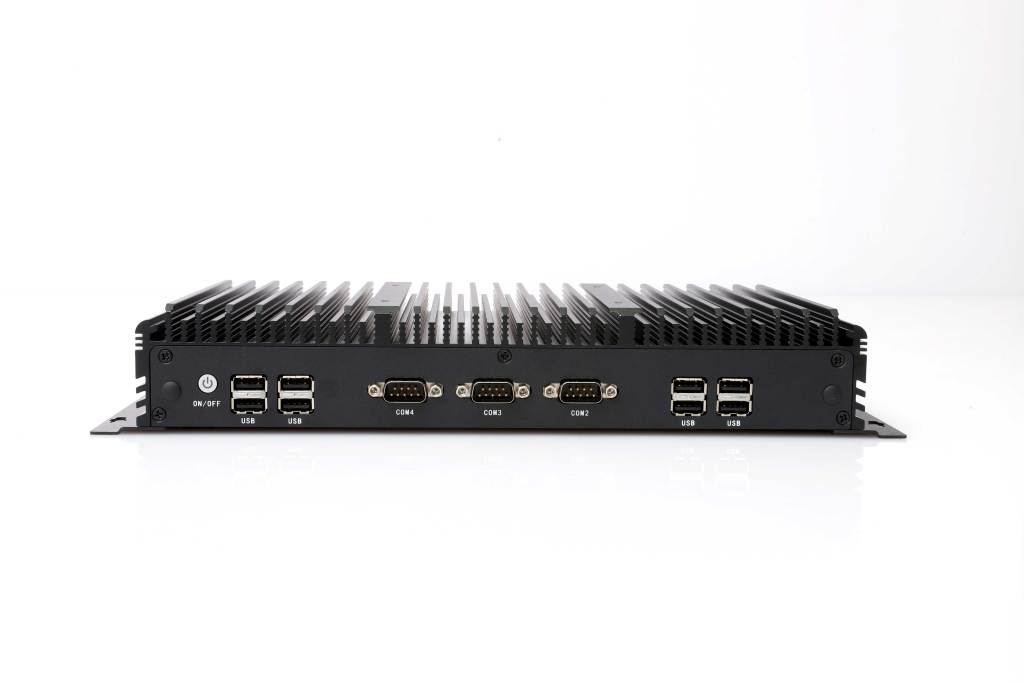
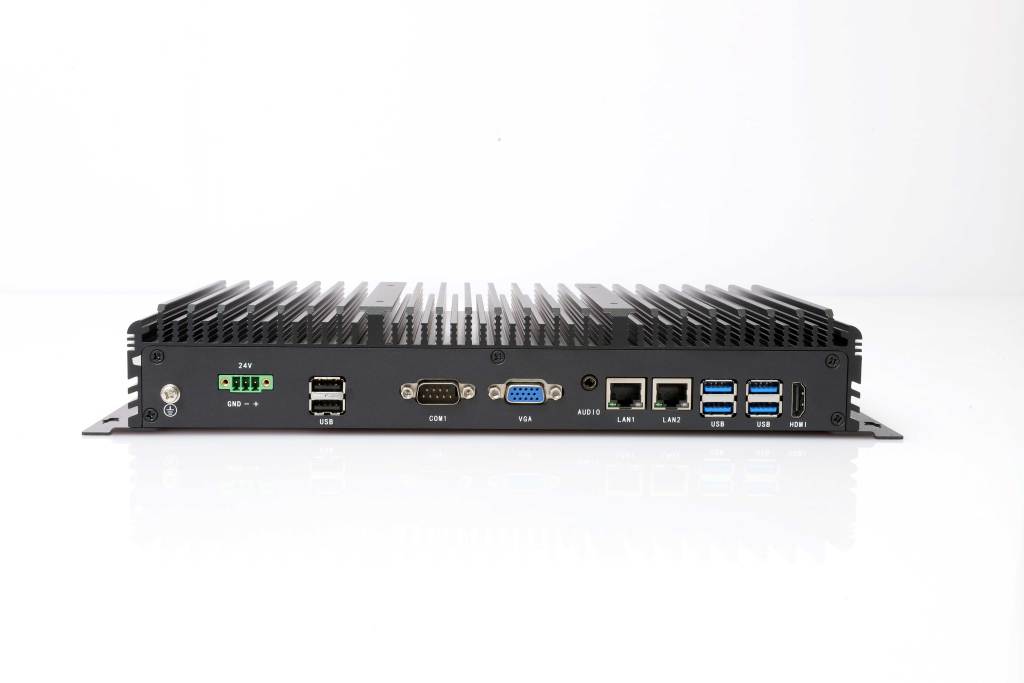
Three 12th Gen builds, 3.7 kg of socket hardware
The UPC-302F runs the Intel® Core™ 12th Gen platform on 8–32GB DDR5 with a 1× mSATA SSD, in three orderable builds: i3-1215U, i5-1235U and i7-1255U, with part numbers C10.03.16.001 to C10.03.16.003 and 8GB standard memory in each. At 3.7 kg in a 337 × 160 × 47.5 mm chassis it is heavier than the 2.3 kg members of the same footprint — the difference is the fourteen USB sockets and the serial shells, and it is why the connectors are on the chassis rather than on a breakout board.
- 3 builds: i3-1215U / i5-1235U / i7-1255U, 8GB standard in each
- C10.03.16.001 to C10.03.16.003 — same I/O, different compute
- DDR5 8–32GB and 1× mSATA SSD
- 337 × 160 × 47.5 mm, 3.7 kg, wall bracket or VESA mount
- CE / FCC / BIS to EN 55032 & EN 55035, ODM BIOS and OEM branding
Configurations
Choose the UPC-302F configuration
Three factory builds on one chassis. All fourteen USB ports, the serial mix, the dual display outputs, the enclosure and the mounting — 14× USB Type-A (10× USB 2.0 + 4× USB 3.0) · 3× RS232 + 1× RS485 on DB9 · HDMI + VGA dual display · audio · 2× Intel I210 Gigabit LAN — are identical across all three, and standard memory is 8GB in every build; only the processor changes.
Intel® Core™ i3-1215U
Entry · Core i3
Best forSelf-service kiosks where the fourteen USB ports are mostly readers, cameras and printers running at USB 2.0 speed.
Part number C10.03.16.001 — standard build: 8GB memory, mSATA SSD 256GB.
System core
| Processor | Intel® Core™ i3-1215U |
| Memory | 8GB (8–32GB DDR5) |
| Storage | mSATA SSD 256GB |
| Storage slots | 1× mSATA SSD |
| Cooling | Fanless |
| Operating system | Windows 10 / 11 · Linux Ubuntu 16.04–22.04 |
USB & interfaces
| USB 2.0 | 10× USB 2.0 |
| USB 3.0 | 4× USB 3.0 |
| USB total | 14× USB Type-A |
| COM | 3× RS232 + 1× RS485 (DB9) |
| Serial total | 4 serial ports |
| Display | 1× HDMI + 1× VGA (dual display) |
| Audio | 1× audio |
| Expansion | 1× Mini PCIe socket |
| Ethernet | 2× 10/100/1000M Intel I210 Gigabit LAN |
Wireless & expansion
| Wireless network | 4G full network compatibility (optional) |
| Wi-Fi | Wi-Fi / Bluetooth |
Power
| DC input | 1× 3-pin pluggable terminal block, 12V DC (9–36V DC optional) |
| Booting | AT / ATX |
Environmental
| Operating temperature | 0–50 ℃ (−40–70 ℃ optional) |
| Storage temperature | −10–60 ℃ |
| Humidity | 10%–90%, non-condensing |
| EMC | CE, FCC (EN 55032 & EN 55035) |
| Factory | ISO 9001:2015 |
Mechanical
| Dimension | 337 (W) × 160 (D) × 47.5 (H) mm |
| Weight | 3.7 KG |
| Material | High-strength aluminium alloy |
| Mounting | Wall mount / VESA mount |
Compliance & ODM
| Certifications | CE / FCC / BIS, according to EN 55032 & EN 55035 |
| ODM | BIOS / Boot on LOGO / OEM |
Intel® Core™ i5-1235U
Balanced · Core i5
Best forKiosk and counter fleets that run the application, the readers and a local log on the same box, with headroom for a second display.
Part number C10.03.16.002 — standard build: 8GB memory, mSATA SSD 256GB.
System core
| Processor | Intel® Core™ i5-1235U |
| Memory | 8GB (8–32GB DDR5) |
| Storage | mSATA SSD 256GB |
| Storage slots | 1× mSATA SSD |
| Cooling | Fanless |
| Operating system | Windows 10 / 11 · Linux Ubuntu 16.04–22.04 |
USB & interfaces
| USB 2.0 | 10× USB 2.0 |
| USB 3.0 | 4× USB 3.0 |
| USB total | 14× USB Type-A |
| COM | 3× RS232 + 1× RS485 (DB9) |
| Serial total | 4 serial ports |
| Display | 1× HDMI + 1× VGA (dual display) |
| Audio | 1× audio |
| Expansion | 1× Mini PCIe socket |
| Ethernet | 2× 10/100/1000M Intel I210 Gigabit LAN |
Wireless & expansion
| Wireless network | 4G full network compatibility (optional) |
| Wi-Fi | Wi-Fi / Bluetooth |
Power
| DC input | 1× 3-pin pluggable terminal block, 12V DC (9–36V DC optional) |
| Booting | AT / ATX |
Environmental
| Operating temperature | 0–50 ℃ (−40–70 ℃ optional) |
| Storage temperature | −10–60 ℃ |
| Humidity | 10%–90%, non-condensing |
| EMC | CE, FCC (EN 55032 & EN 55035) |
| Factory | ISO 9001:2015 |
Mechanical
| Dimension | 337 (W) × 160 (D) × 47.5 (H) mm |
| Weight | 3.7 KG |
| Material | High-strength aluminium alloy |
| Mounting | Wall mount / VESA mount |
Compliance & ODM
| Certifications | CE / FCC / BIS, according to EN 55032 & EN 55035 |
| ODM | BIOS / Boot on LOGO / OEM |
Intel® Core™ i7-1255U
Performance · Core i7
Best forThe heaviest USB load in the family — several cameras on USB 3.0 plus ten USB 2.0 devices, with image processing on the same unit.
Part number C10.03.16.003 — standard build: 8GB memory, mSATA SSD 256GB.
System core
| Processor | Intel® Core™ i7-1255U |
| Memory | 8GB (8–32GB DDR5) |
| Storage | mSATA SSD 256GB |
| Storage slots | 1× mSATA SSD |
| Cooling | Fanless |
| Operating system | Windows 10 / 11 · Linux Ubuntu 16.04–22.04 |
USB & interfaces
| USB 2.0 | 10× USB 2.0 |
| USB 3.0 | 4× USB 3.0 |
| USB total | 14× USB Type-A |
| COM | 3× RS232 + 1× RS485 (DB9) |
| Serial total | 4 serial ports |
| Display | 1× HDMI + 1× VGA (dual display) |
| Audio | 1× audio |
| Expansion | 1× Mini PCIe socket |
| Ethernet | 2× 10/100/1000M Intel I210 Gigabit LAN |
Wireless & expansion
| Wireless network | 4G full network compatibility (optional) |
| Wi-Fi | Wi-Fi / Bluetooth |
Power
| DC input | 1× 3-pin pluggable terminal block, 12V DC (9–36V DC optional) |
| Booting | AT / ATX |
Environmental
| Operating temperature | 0–50 ℃ (−40–70 ℃ optional) |
| Storage temperature | −10–60 ℃ |
| Humidity | 10%–90%, non-condensing |
| EMC | CE, FCC (EN 55032 & EN 55035) |
| Factory | ISO 9001:2015 |
Mechanical
| Dimension | 337 (W) × 160 (D) × 47.5 (H) mm |
| Weight | 3.7 KG |
| Material | High-strength aluminium alloy |
| Mounting | Wall mount / VESA mount |
Compliance & ODM
| Certifications | CE / FCC / BIS, according to EN 55032 & EN 55035 |
| ODM | BIOS / Boot on LOGO / OEM |
Drawings
Dimensions and certifications
Check the depth against your cabinet before ordering — at 47.5 mm the UPC-302F fits back plates where a standard box PC will not.


Ordering information
Part numbers and standard builds
Each row is a complete factory build: the part number fixes processor, memory and storage. The enclosure, the mounting and the full I/O set — 14× USB Type-A (10× USB 2.0 + 4× USB 3.0) · 3× RS232 + 1× RS485 on DB9 · HDMI + VGA dual display · audio · 2× Intel I210 Gigabit LAN — are the same for every row.
| NO. | Model | Product Part Number | Description | Standard Memory | Standard Storage |
|---|---|---|---|---|---|
| 1 | UPC-302F | C10.03.16.001 | Intel® Core™ i3-1215U Processor | 8GB | mSATA SSD 256GB |
| 2 | UPC-302F | C10.03.16.002 | Intel® Core™ i5-1235U Processor | 8GB | mSATA SSD 256GB |
| 3 | UPC-302F | C10.03.16.003 | Intel® Core™ i7-1255U Processor | 8GB | mSATA SSD 256GB |
Contact sales for volume pricing, memory and storage upgrades, the −40–70 ℃ extended temperature build, and 4G / Wi-Fi configuration on the same part numbers.
Downloads
UPC-302F downloads
The full specification is available immediately. Manuals, drivers, certificates and drawings are issued with the quotation.
UPC-302F datasheet
Full specifications, I/O layout, dimensions and the ordering table (PDF).
Panel PC buying guide
How to size the display, choose the protection rating and specify the cutout.
Industrial PC FAQ
Processor, operating system, mounting and environmental questions.
Manual, drivers & certificates
User manual, driver pack, CE / FCC / BIS certificates, 2D and 3D drawings — issued per order.
FAQ
UPC-302F frequently asked questions
Questions about the fourteen USB ports and how a kiosk uses them, the dual display outputs, the serial channels for legacy readers, the three processor builds and the fanless 3.7 kg chassis.
Why would a kiosk need fourteen USB ports?
Because in a self-service kiosk almost everything except the panel is a USB device. The 14 ports on the UPC-302F — ten USB 2.0 and four USB 3.0 — are enough for a passport or document reader, a boarding-pass printer, a receipt printer, a camera, a signature pad, a card reader, an RFID reader, a barcode scanner, a status display and a service keyboard, with the USB 3.0 pair left for the camera or an external archive drive. When a kiosk needs one more reader, the box does not need to be replaced.
What makes this model suitable for airport and terminal installations?
Three things the terminal environment asks for. Fanless construction, so there is no filter to clean and no fan to seize in an unattended public unit. 14 USB ports and dual HDMI + VGA outputs, which is the device count a self-service check-in, bag-drop or boarding unit actually carries. And dual Intel I210 Gigabit LAN, so the terminal network and a separate service or management network stay separate.
Can it drive two displays at the same time?
Yes — 1× HDMI and 1× VGA run simultaneously. In kiosk work that usually means one screen for the passenger and one for maintenance or staff, or a main display plus a status or advertising panel. The VGA output also matters in terminal buildings where older panels, long analogue cable runs and existing KVMs are still VGA: the output is on the chassis, so no adapter hangs off the machine.
What are the serial ports used for on a USB-dense box?
Readers and legacy peripherals that never moved to USB. The {model} carries 3× RS232 and 1× RS485 on DB9: the RS232 channels take document or card readers, scales, printers and older controllers, and the single RS485 channel drives a multi-drop bus — for example a chain of status displays or meters along one counter run — without an external converter.
Do the fourteen USB ports need external power?
For normal kiosk loads, no. The ports are fed from the chassis and the device mix — readers, printers, a camera and a signature pad — sits inside what a standard USB port supplies. Devices with their own high current demand, such as a large external disk, should keep their own power supply, which is standard practice on any industrial PC. Send us the device list with the kiosk order and we will confirm the configuration and the port assignment.
How much memory and storage should a kiosk box carry?
8–32GB DDR5 with a 1× mSATA SSD. A kiosk application plus a reader stack plus a local log fits comfortably in 8GB; move to 16GB or 32GB when the unit also holds images, a local database or a browser-based interface that keeps several sessions open. The mSATA SSD is the standard build storage, and the single board layout keeps it serviceable.
What are the physical and power requirements?
The chassis is 337 × 160 × 47.5 mm and weighs 3.7 kg, milled from high-strength aluminium alloy and mounted on a wall bracket or a VESA plate — which is how kiosk enclosures normally carry the PC. Power is 12V DC on a 3-pin pluggable terminal block with 9–36V DC optional, and startup can be set to AT so the unit comes back by itself when terminal power is restored.
How does it hold up in an unattended public unit?
It is completely fanless, so there is no filter to clean and no air path pulling dust through the electronics — the most common cause of a kiosk PC needing attention. Operating temperature is 0–50 ℃ as standard with −40–70 ℃ optional, storage is −10–60 ℃, humidity is 10%–90% non-condensing. Certifications are CE, FCC and BIS to EN 55032 and EN 55035, with ODM support for custom BIOS, boot-on-LOGO and OEM branding for fleet deployments.
Related models
Other models in the family
The LEGO MODE box PC family covers digital I/O and fieldbus, serial and USB, multi-LAN, cellular and power-redundant variants on one modular platform. The UPC-302F carries more USB ports than anything else in the family; if you need a smaller USB count with five RS232 channels, five LAN ports, 8×8 digital I/O, a DB37 serial bank or battery backup, one of its siblings carries it.
Tell us your I/O list and your cabinet space
Send us the signals you need to read and drive, the ports, the supply voltage and the space available. We will confirm the configuration, the part number, the lead time and the price — typically the same working day.
Request a quotation
Tell us what you need — we will quote the UPC-302F
Pick the specification and the application below — every answer reaches us as a separate line, so one reply can confirm the exact build, lead time and price. Not sure about a field? Leave it on “advise me” and our engineers will choose for you.

