
10× COM · 8 CPU options · 6063 aluminium extrusion
EPC-308O Fanless Industrial PC with 10 COM Ports
8× RS232 + 2× RS485 · 2× Intel I210 LAN · 2× USB 2.0 + 4× USB 3.0 · VGA + HDMI · 337 × 160 × 47.5 mm · 3.3 kg
Ten COM ports on one industrial PC — eight RS232 and two RS485 — so a PLC, several drives, scales, barcode readers and temperature controllers sit on the same unit instead of being spread across three or four serial-to-Ethernet converters. The chassis is a 337 × 160 × 47.5 mm 6063 aluminium extrusion cooled through its fins, and the board supports eight processor options from Celeron J1900 up to 12th Gen Core i7-1250U, including the 7th Gen Core i3-7100U, i5-7200U and i7-7500U.
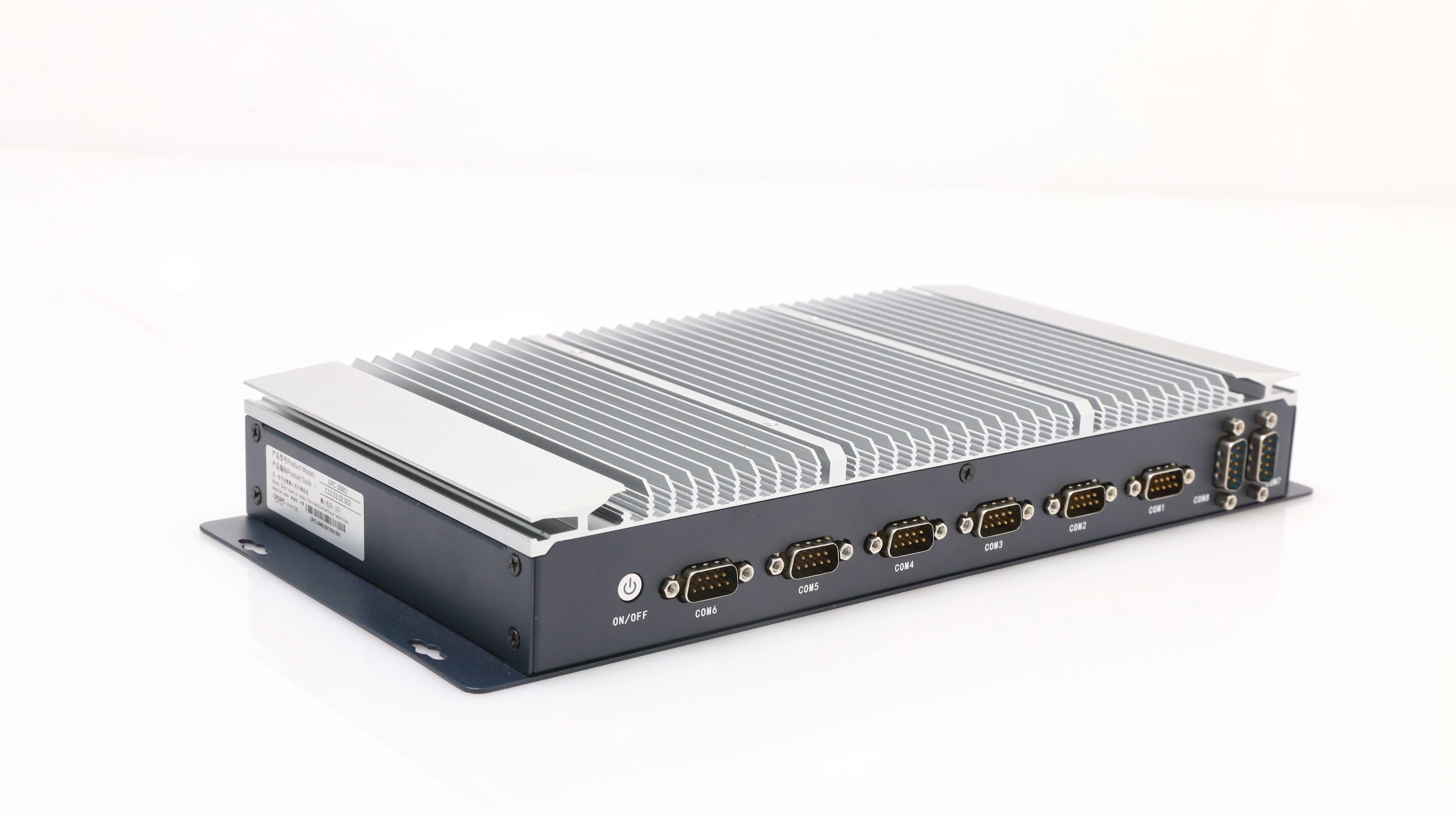
10× COM (8× RS232 + 2× RS485)8 CPU options2× Intel I210 LAN60,000 h MTBFFanless · no intake filterCE / FCC
10
COM ports
8
CPU options
3.3 kg
Gross weight
60,000 h
MTBF
OEM
BIOS / logo / ODM
At a glance
EPC-308O key specifications
Every figure below comes from the current EPC-308O datasheet. The counts shown are for the 7th Gen Core build; the Celeron and 12th Gen builds differ in USB mix and LAN count and are listed in the configuration tabs.
Processor
Intel® Core™ i3-7100U / i5-7200U / i7-7500U (Celeron and 12th Gen also available)
Serial
10× COM — 8× RS232 + 2× RS485
Memory
4–16 GB DDR4, 8 GB standard
Storage
1× mSATA SSD, 256 GB standard
LAN
2× Intel I210 Gigabit
Display
1× VGA + 1× HDMI
USB
2× USB 2.0 + 4× USB 3.0
Power
12V DC aviation connector (9–36V DC optional)
Configuration
Choose the EPC-308O configuration
Three 7th Gen Core builds share the same chassis, the same ten COM ports (8× RS232 + 2× RS485), the same dual Intel I210 LAN and the same 337 × 160 × 47.5 mm enclosure. Only the processor changes — the Celeron J1900, Celeron J6412 and 12th Gen Core builds are available on request.
i3-7100U
Entry build for pure serial concentration — PLC polling, data logging and a single HMI.
System core
| Processor | Intel® Core™ i3-7100U (7th Gen, 15 W) |
| Cores / threads | 2 / 4 |
| Frequency | 2.4 GHz |
| Cache | 4 MB |
| Graphics | Intel UHD |
| Memory | 4–16 GB DDR4, 8 GB standard |
| Storage | 1× mSATA SSD, 256 GB standard |
Serial & interfaces
| Serial | 8× RS232 + 2× RS485 (10× DB9 total) |
| USB | 2× USB 2.0 + 4× USB 3.0 |
| Display | 1× VGA + 1× HDMI |
| Ethernet | 2× Intel I210 Gigabit |
| Audio | 3.5 mm TRRS |
Power & wireless
| DC input | 1× 2-pin aviation connector, 12V DC — 9–36V DC optional |
| Power button | 1× ATX power on/off button |
| Booting | 1× ATX mode switch (internal setting) |
| Wi-Fi | Intel NE2235 300 Mbps, 802.11a/b/g/n, 2.4G/5G |
| Mobile network | 4G LTE full netcom module |
Environmental & mechanical
| Operating temperature | 0–50 °C (−40 to 70 °C optional) |
| Storage temperature | −10 to 60 °C |
| Relative humidity | 10–90%, non-condensing |
| Thermal management | Fanless — no fan, no intake filter |
| Dimensions | 337.0 (W) × 160.0 (D) × 47.5 (H) mm |
| Weight | 3.3 kg gross |
Compliance & ODM
| EMC | CE, FCC (EN 55032 & EN 55035), EN IEC 61000-3-2 |
| Factory | ISO 9001:2015 |
| MTBF | 60,000 hours |
| ODM | BIOS, boot logo, OEM labelling |
i5-7200U
The same ten ports with headroom for a database, a reporting service or a second HMI client.
System core
| Processor | Intel® Core™ i5-7200U (7th Gen, 15 W) |
| Cores / threads | 2 / 4 |
| Frequency | 2.5–3.10 GHz |
| Cache | 4 MB |
| Graphics | Intel UHD |
| Memory | 4–16 GB DDR4, 8 GB standard |
| Storage | 1× mSATA SSD, 256 GB standard |
Serial & interfaces
| Serial | 8× RS232 + 2× RS485 (10× DB9 total) |
| USB | 2× USB 2.0 + 4× USB 3.0 |
| Display | 1× VGA + 1× HDMI |
| Ethernet | 2× Intel I210 Gigabit |
| Audio | 3.5 mm TRRS |
Power & wireless
| DC input | 1× 2-pin aviation connector, 12V DC — 9–36V DC optional |
| Power button | 1× ATX power on/off button |
| Booting | 1× ATX mode switch (internal setting) |
| Wi-Fi | Intel NE2235 300 Mbps, 802.11a/b/g/n, 2.4G/5G |
| Mobile network | 4G LTE full netcom module |
Environmental & mechanical
| Operating temperature | 0–50 °C (−40 to 70 °C optional) |
| Storage temperature | −10 to 60 °C |
| Relative humidity | 10–90%, non-condensing |
| Thermal management | Fanless — no fan, no intake filter |
| Dimensions | 337.0 (W) × 160.0 (D) × 47.5 (H) mm |
| Weight | 3.3 kg gross |
Compliance & ODM
| EMC | CE, FCC (EN 55032 & EN 55035), EN IEC 61000-3-2 |
| Factory | ISO 9001:2015 |
| MTBF | 60,000 hours |
| ODM | BIOS, boot logo, OEM labelling |
i7-7500U
Heaviest 7th Gen option for SCADA, historians or several applications on one box.
System core
| Processor | Intel® Core™ i7-7500U (7th Gen, 15 W) |
| Cores / threads | 2 / 4 |
| Frequency | 2.70–3.50 GHz |
| Cache | 4 MB |
| Graphics | Intel UHD |
| Memory | 4–16 GB DDR4, 8 GB standard |
| Storage | 1× mSATA SSD, 256 GB standard |
Serial & interfaces
| Serial | 8× RS232 + 2× RS485 (10× DB9 total) |
| USB | 2× USB 2.0 + 4× USB 3.0 |
| Display | 1× VGA + 1× HDMI |
| Ethernet | 2× Intel I210 Gigabit |
| Audio | 3.5 mm TRRS |
Power & wireless
| DC input | 1× 2-pin aviation connector, 12V DC — 9–36V DC optional |
| Power button | 1× ATX power on/off button |
| Booting | 1× ATX mode switch (internal setting) |
| Wi-Fi | Intel NE2235 300 Mbps, 802.11a/b/g/n, 2.4G/5G |
| Mobile network | 4G LTE full netcom module |
Environmental & mechanical
| Operating temperature | 0–50 °C (−40 to 70 °C optional) |
| Storage temperature | −10 to 60 °C |
| Relative humidity | 10–90%, non-condensing |
| Thermal management | Fanless — no fan, no intake filter |
| Dimensions | 337.0 (W) × 160.0 (D) × 47.5 (H) mm |
| Weight | 3.3 kg gross |
Compliance & ODM
| EMC | CE, FCC (EN 55032 & EN 55035), EN IEC 61000-3-2 |
| Factory | ISO 9001:2015 |
| MTBF | 60,000 hours |
| ODM | BIOS, boot logo, OEM labelling |
Why this layout
Why put ten serial ports in one box
Serial devices did not disappear from the cabinet; they were pushed out to converters. This box puts them back on the computer.
One box instead of a converter stack
Eight RS232 ports and two RS485 ports cover a PLC, several drives, two scales, a barcode reader and a temperature controller without a stack of serial-to-Ethernet converters, each with its own power brick, IP address, firmware revision and failure mode. One power feed, one image to back up, one device to diagnose when a port goes quiet. If seven ports cover the cabinet, the EPC-202B seven-port build is the smaller answer; this machine is for cabinets that ran out at seven.
Eight processor options on one chassis
The same extrusion carries a Celeron J1900 for pure serial concentration, a 7th Gen Core for HMI and SCADA work, or a 12th Gen Core when the box also has to run vision or analytics — the 12th Gen i5 and i7 are the only builds with Intel Iris Xe graphics and DDR5. Only the board, memory, storage, USB mix and LAN count change with the processor; the ten serial ports stay.
Where this box is the wrong choice
If the cabinet needs digital I/O rather than serial, the EPC-302A with 8×8 GPIO puts the I/O on the same board set as the processor. If the panel and the computer have to be one unit at the machine, start from the industrial panel PC range instead.
Drawings
Dimensions and certifications
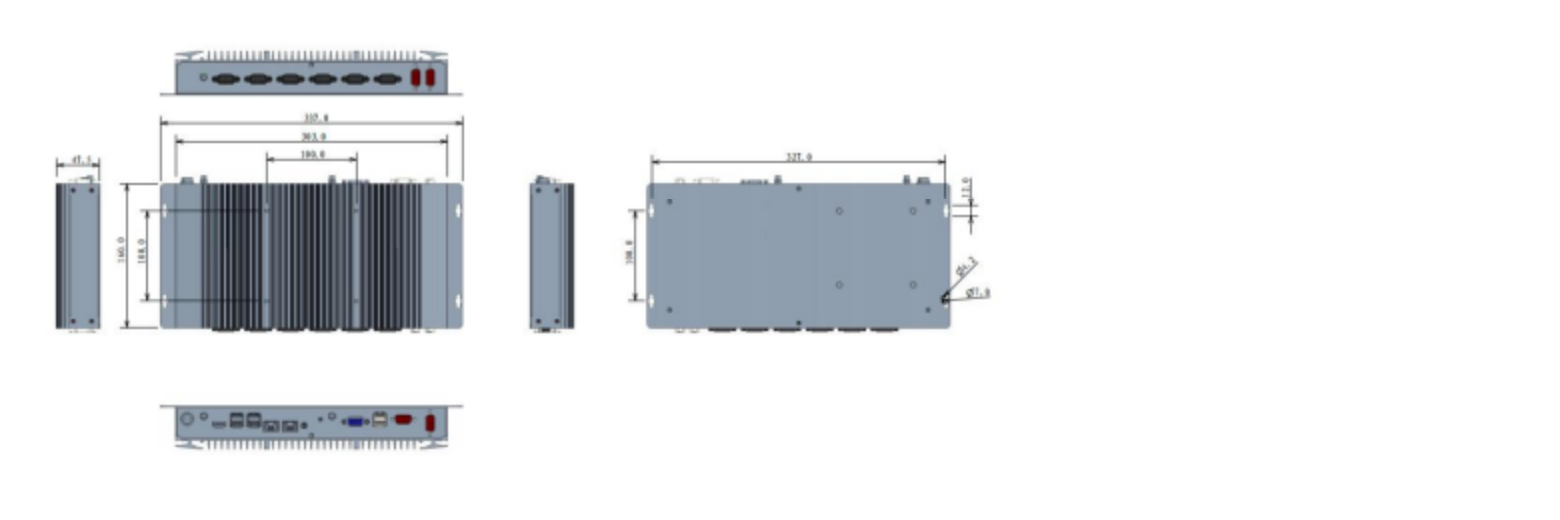
Check the depth against your cabinet before ordering — at 47.5 mm the EPC-308O fits back plates where a standard box PC will not, and the 327 × 100 mm installation footprint matches the rest of the LEGO MODE family.

Ordering information
Standard builds
Each row is a complete factory build: the processor fixes the standard memory, storage and I/O mix. The enclosure, the mounting and the ten COM ports — 8× RS232 + 2× RS485 — are the same for every row.
| NO. | Processor | Standard memory | Standard storage | USB / LAN mix |
|---|---|---|---|---|
| 1 | Celeron J1900 | 4 GB | 128 GB SSD | 1× USB 3.0 + 5× USB 2.0 · 2× Intel I210 |
| 2 | Celeron J6412 | 8 GB | 256 GB SSD | 2× USB 3.0 + 4× USB 2.0 · 5× Intel I210 |
| 3 | Core i3-7100U | 8 GB | 256 GB SSD | 4× USB 3.0 + 2× USB 2.0 · 2× Intel I210 |
| 4 | Core i5-7200U | 8 GB | 256 GB SSD | 4× USB 3.0 + 2× USB 2.0 · 2× Intel I210 |
| 5 | Core i7-7500U | 8 GB | 256 GB SSD | 4× USB 3.0 + 2× USB 2.0 · 2× Intel I210 |
| 6 | Core i3-1215U | 8 GB | 256 GB SSD | 4× USB 3.0 + 2× USB 2.0 · 2× Intel I210 |
| 7 | Core i5-1235U | 16 GB | 256 GB SSD | 4× USB 3.0 + 2× USB 2.0 · 2× Intel I210 |
| 8 | Core i7-1250U | 8 GB | 256 GB SSD | 4× USB 3.0 + 2× USB 2.0 · 2× Intel I210 |
CPU model may vary — contact sales to confirm the current build. Part numbers are issued with the quotation.
I/O in detail
Ten DB9 ports on two faces
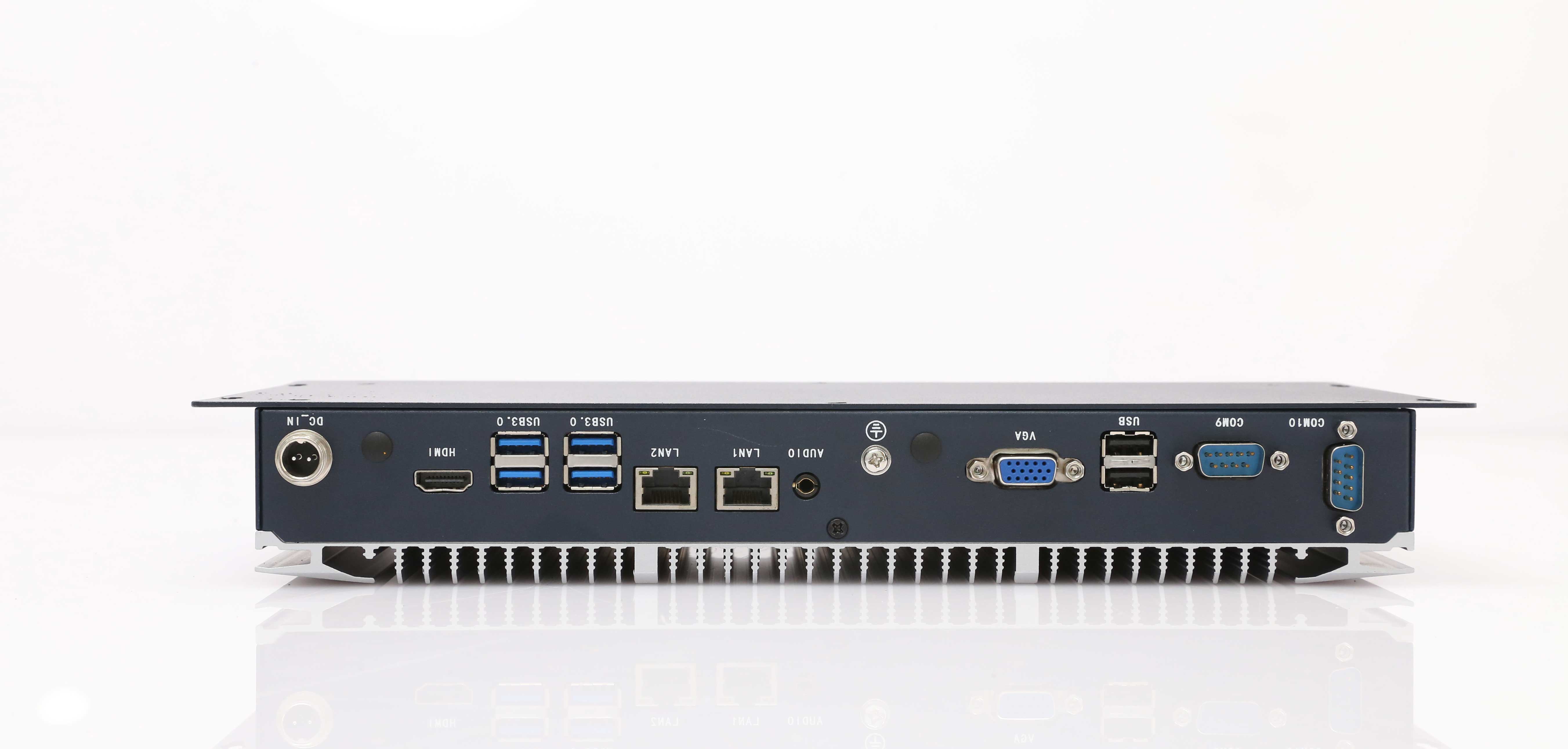
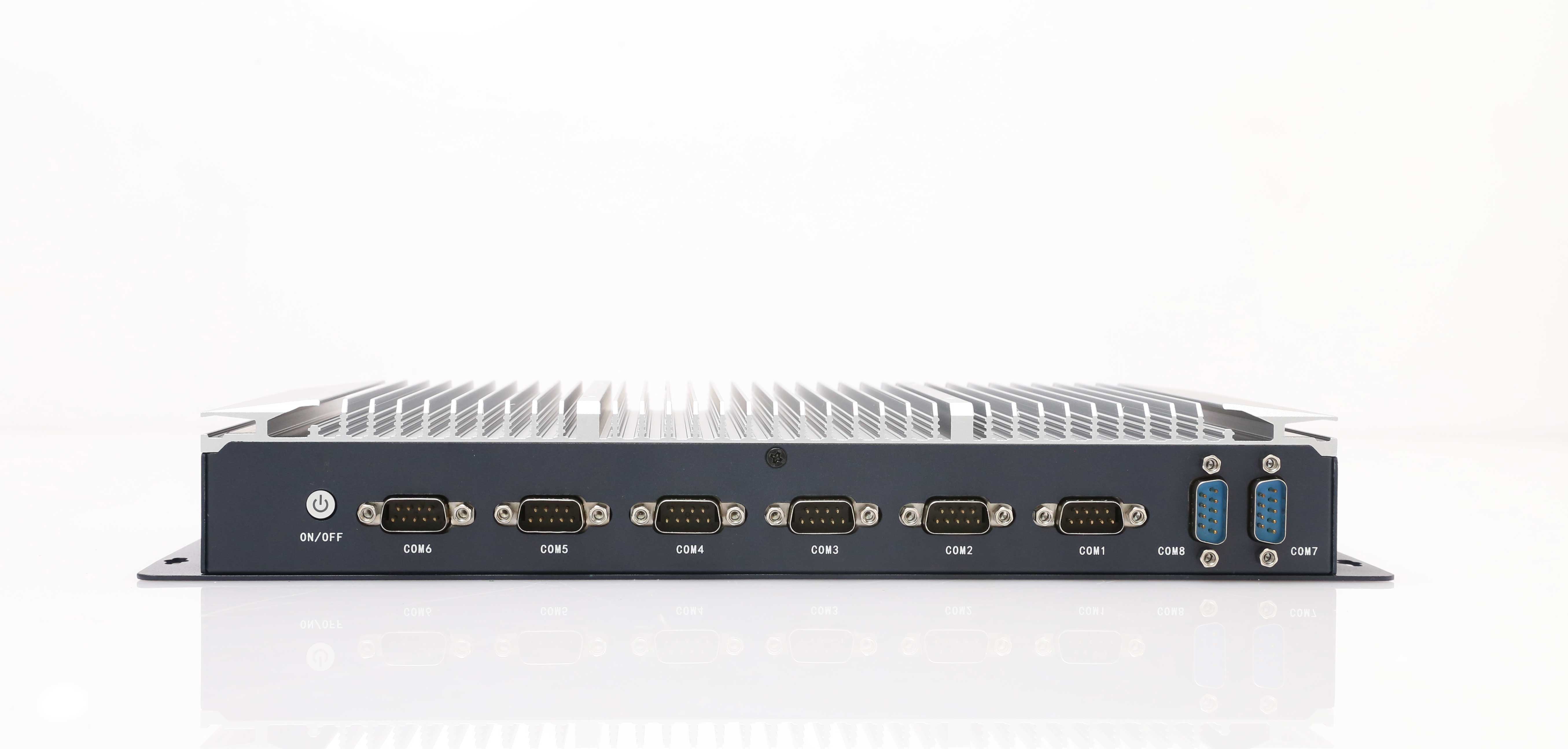
COM1 to COM8 on the front face beside the power button; COM9 and COM10 on the rear face alongside dual Intel I210 LAN, VGA, HDMI, USB and audio, with the 2-pin aviation DC input.


FAQ
EPC-308O frequently asked questions
Figures below are quoted from the current datasheet.
How many serial ports does the EPC-308O have?
Ten: eight RS232 and two RS485 on DB9 connectors. Eight sit on the front face beside the power button and COM9 with COM10 on the rear face. Every port is a physical DB9 on the chassis, so no expansion card is needed. CESIPC also builds a seven-port EPC-202B for smaller cabinets.
Which processors are available?
Eight builds share the chassis: Celeron J1900, Celeron J6412, Core i3-7100U, i5-7200U, i7-7500U, i3-1215U, i5-1235U and i7-1250U. The 7th Gen i3/i5/i7 pair 4–16 GB DDR4 with one mSATA SSD; the 12th Gen builds move to DDR5 with two M.2 slots and Iris Xe graphics on the i5 and i7.
How much memory and storage does it ship with?
On the 7th Gen Core builds the standard configuration is 8 GB DDR4 and a 256 GB SSD in the single mSATA slot, expandable to 16 GB of memory. The Celeron J1900 build ships with 4 GB and 128 GB; the Celeron J6412 and the 12th Gen builds ship with 8 GB and 256 GB.
Is the EPC-308O fanless?
Yes. The chassis is a 6063 aluminium extrusion measuring 337 × 160 × 47.5 mm, cooled through its fins: there is no fan and no intake filter, so no air is pulled through the enclosure and there is no filter to service. That also removes the most common mechanical failure point in a dusty cabinet.
What is the operating temperature range?
0–50 °C as standard, with a −40 to 70 °C option. Storage is rated −10 to 60 °C and relative humidity 10–90% non-condensing. The unit is CE and FCC marked to EN 55032 and EN 55035, with a 60,000-hour MTBF rating.
Can one box really replace several serial converters?
That is the intended use. Ten DB9 ports let a PLC, several drives, scales, readers and temperature controllers terminate on the computer itself. What it replaces is a stack of serial-to-Ethernet converters, each with its own power supply and configuration — not the devices themselves.
Which operating systems are supported?
Windows 10 and Windows 11, plus Ubuntu 16.04, 18.04, 20.04 and 22.04. The Celeron J1900 build can also run Windows 7 if the application still requires it. BIOS, boot logo and OEM labelling are available through the ODM programme.
Downloads
EPC-308O downloads
The full specification is available immediately. Manuals, drivers, certificates and drawings are issued with the quotation.
EPC-308O datasheet
Full specifications, I/O layout, dimensions and the ordering table (PDF, 3 pages).
Multi COM port PC in the field
An EPC-202B seven-port build running environmental monitoring systems.
Fanless box PC range
The full LEGO MODE box PC range this model belongs to.
Manual, drivers & certificates
Request the documentation set for this build.
Related models
Other models in the family
The LEGO MODE box PC family covers digital I/O and fieldbus, serial and USB, multi-LAN, cellular and power-redundant variants on one modular platform. The EPC-308O is the one built around ten COM ports; if you need digital I/O instead of serial, five LAN, battery backup or a SIM-card slot, one of its siblings carries it.
Quotation
Tell us your port list and your cabinet space
Send the device list with the protocol of each serial device, the ambient temperature and the mounting space. Our engineers reply with the configuration, the port labelling and a quotation, typically within 24 hours.
Talk to a CESIPC Engineer — application engineers help you select the configuration, discuss ODM requirements or provide a tailored quotation. Typical response within 24 hours · Multilingual support.


We use your details only to answer this enquiry — no newsletters, no sharing. Drawings or a photo of the existing panel can be sent to sales@cesipc.com.