
RFID industrial panel PC · 21.5″ Full HD · 13.56 MHz reader · IC / ID cards · IP65
UTC-S2162C 21.5-inch RFID Panel PC for MES Terminals and Work-Order Stations
21.5″ 1920 × 1080 · IP65 front · 2× Intel LAN · 6.0 kg
A full-size screen with the badge reader built in. The UTC-S2162C pairs a 13.56 MHz reader for IC and ID cards with a 21.5-inch 1920 × 1080 display, so one station can show who is logged in, which work order is running, the SOP and the live line status together. Cards report over RS232 or USB, the front is IP65, and the documented build is Celeron J1900 — with J6412, 10th Gen and 12th Gen Core boards on the same chassis.
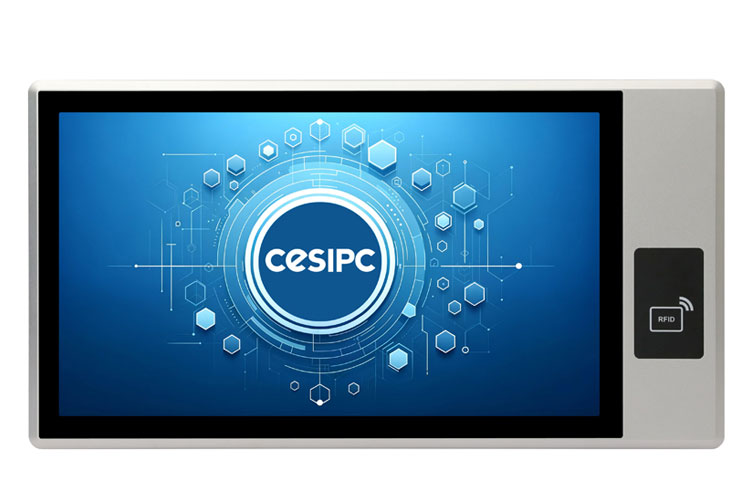
13.56 MHz readerIC / ID cards0~60 mm read distance21.5″ 1920 × 1080Celeron J1900IP65 front
17+
Years
50+
Countries
1
MOQ unit
2–4
Weeks lead
OEM
ODM & branding
At a glance
UTC-S2162C key specifications
The panel, the touchscreen, the compute, the ports and the mechanical fit — everything that decides whether this panel drops into your cutout.
Panel size
21.5″ 16:9
Resolution
1920 × 1080
Brightness
300 cd/m² · 500 : 1
Touch
Capacitive (10-point)
Processor
Celeron J1900
Memory
4~8GB DDR3L
Storage
mSATA SSD
Serial
4× RS232 + 2× RS485 (DB9)
USB
5× USB 2.0 + 1× USB 3.0
Ethernet
2× Intel I210 Gigabit LAN
Display
HDMI + VGA (dual display)
Protection
IP65 front
Design notes
Why a 21.5-inch RFID terminal
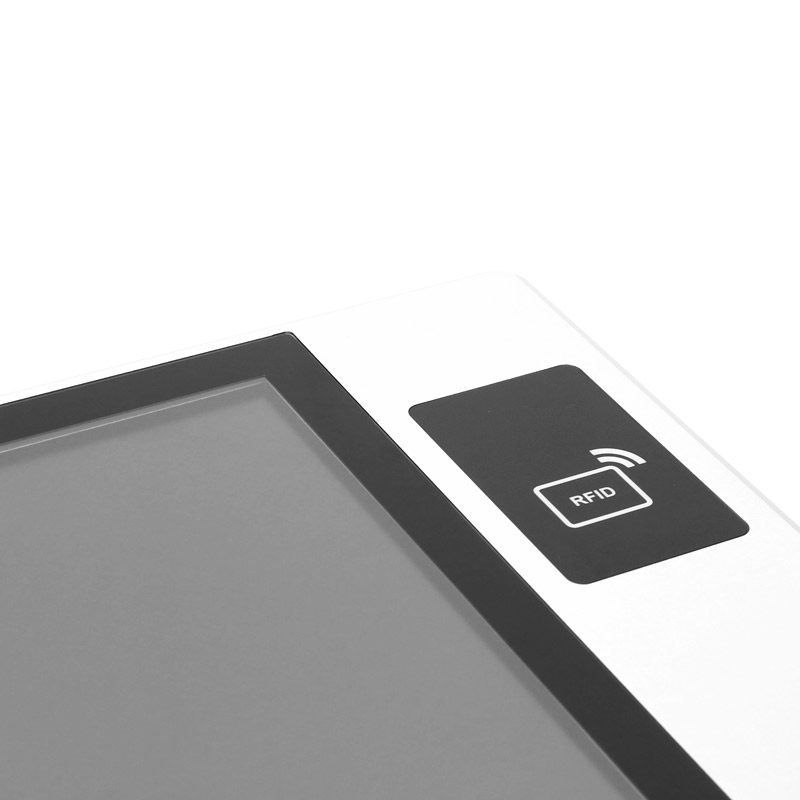
A full 1920 × 1080 screen for the whole work order, not a fragment of it
On a badge-in station the screen usually has to hold four things at once: who is logged in, which work order is running, what to do next, and what the machine is doing. The UTC-S2162C puts a 21.5-inch 16:9 panel at 1920 × 1080 behind the IP65 front — 300 cd/m² at 500:1 — so the SOP or the drawing can sit next to the live line status instead of replacing it. Touch is projected-capacitive with up to 10 points; resistive is available for gloved operation.
- 1920 × 1080 on a 21.5-inch 16:9 panel, 300 cd/m², 500:1
- Projected capacitive touch, 1–10 points; resistive on request
- IP65 front — wiped down without stopping the line
- 614.6 × 326.1 × 81.6 mm, cutout 596.6 × 308.1 mm, 6.0 kg
- Panel, wall or VESA 100 × 100 mounting
The badge reader is part of the panel, not another box on the arm
A separate reader means a second enclosure, a second power adapter and a cable running to it — three things to mount and support at every station. The UTC-S2162C has the 13.56 MHz reader inside the same enclosure as the display — one cutout, one power feed, one device. It reads IC cards as standard with ID cards optional at 0~60 mm, and reports over RS232 (read straight from the serial buffer by a PLC, no operating system involved) or over USB, where the card ID types into whichever field has focus.
- 13.56 MHz reader in the same enclosure as the HMI
- IC card standard, ID card optional, 3.3V~5V (standard 5V)
- 0~60 mm reading distance — tap, do not aim
- RS232 for PLC integration; USB for driver-free keyboard output
- One cutout, one power feed, nothing extra on the machine face
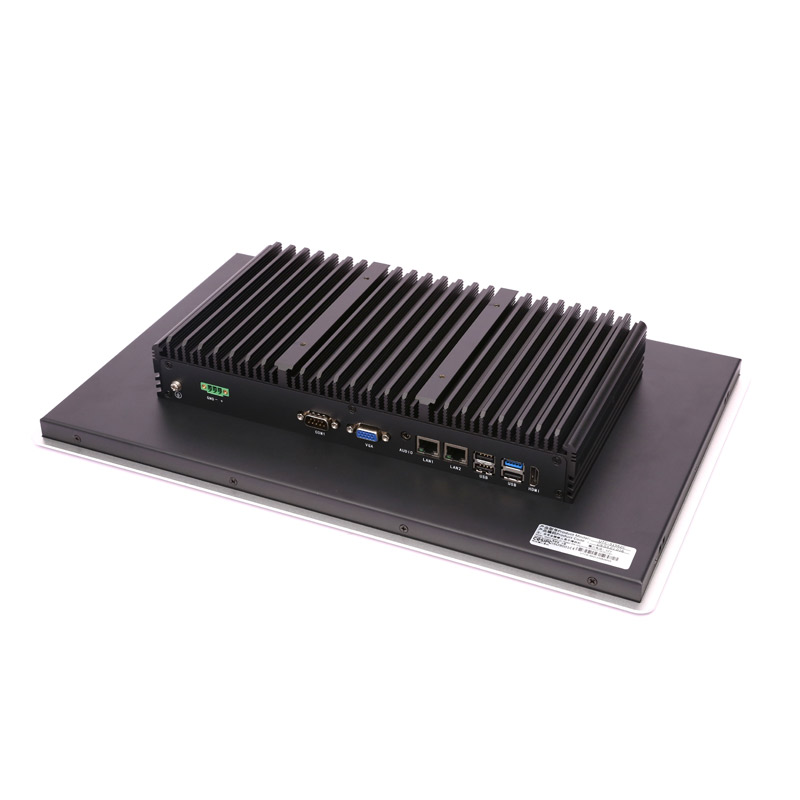
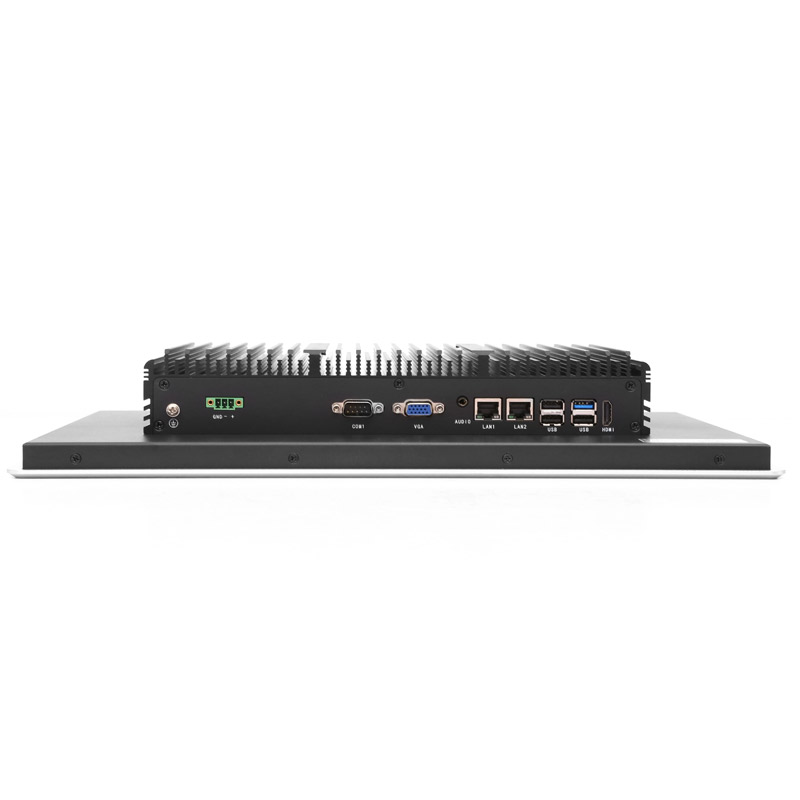
Four serial channels and two LAN ports behind one panel
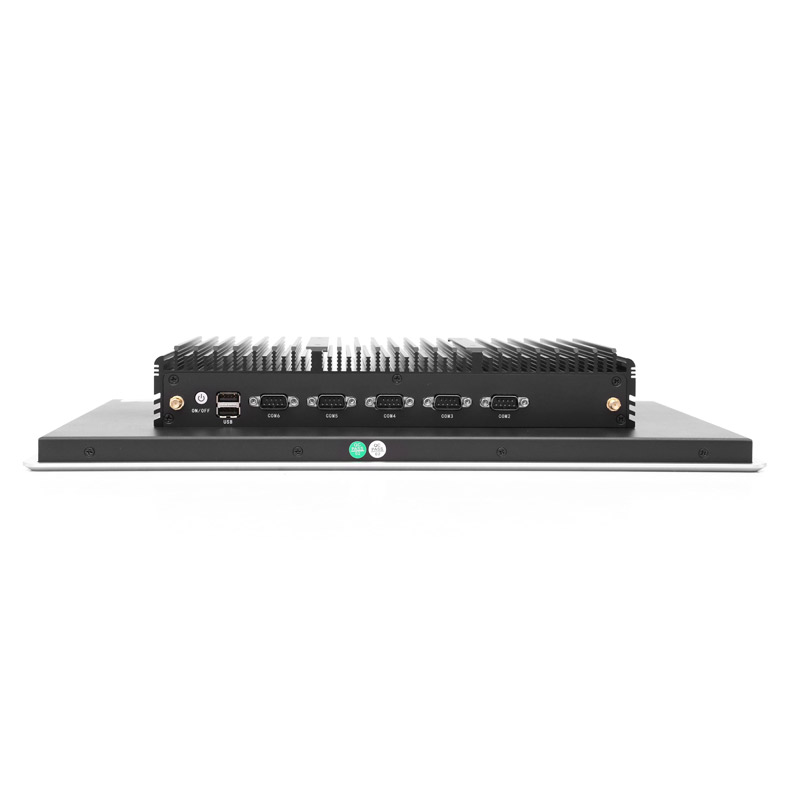
The UTC-S2162C carries 4× RS232 and 2× RS485 on DB9, five USB 2.0 and one USB 3.0 port, HDMI + VGA dual display, audio and 2× Intel I210 Gigabit LAN — one NIC for the machine network and one for the plant or MES network, without an external switch. It runs the documented Celeron J1900 build with 4~8GB DDR3L and an mSATA SSD, and BlockCore™ means Celeron J6412, 10th Gen and 12th Gen Core boards fit the same enclosure, reader and cutout.
- 4× RS232 + 2× RS485 (DB9) for scales, printers and meters
- 2× Intel I210 Gigabit LAN — separate machine and MES networks
- HDMI + VGA dual display, audio, 5× USB 2.0 + 1× USB 3.0
- Celeron J1900, 4~8GB DDR3L, mSATA SSD — BlockCore™ upgradeable
- Wi-Fi built in, 4G LTE and i-Function modules optional
Configurations
Choose the UTC-S2162C configuration
One factory build, on one panel. The display, the touchscreen, the RFID reader, the ports and the cutout are fixed by the configuration; the same chassis is also built with other compute boards, quoted per project.
Celeron J1900
Standard build · Celeron J1900
Best forFull-screen MES terminals — the work order, the SOP, the parts list and the live line status on one 21.5-inch display, with the badge reader in the same enclosure. The same chassis is also built with Celeron J6412, 10th Gen and 12th Gen Core boards, quoted per project.
Part number C11.01.04.043 — standard build: 4GB DDR3L memory, mSATA SSD.
System core
| Processor | Celeron J1900 |
| Memory | 4GB DDR3L (DDR3L, 4~8GB) |
| Storage | mSATA SSD |
| Storage slots | 1× mSATA SSD |
| Operating system | Windows 10 / 11 · Linux Ubuntu 12.04 / 14.04 / 16.04 / 20.04 |
Panel & touch
| Panel size | 21.5-inch TFT LCD, 16:9 |
| Max. resolution | 1920 × 1080 |
| Brightness | 300 cd/m² |
| Contrast | 500 : 1 |
| Touch panel | Projected capacitive touch, 1–10 points (resistive on request) |
| Front protection | Front panel IP65 |
RFID identification
| Card types | IC card standard (ID card optional) |
| Working frequency | 13.56 MHz |
| Reading distance | 0~60 mm |
| Interface | RS232 (direct PLC / controller integration) and USB (driver-free) |
| Operating voltage | 3.3V~5V, standard 5V |
I/O & networking
| USB 2.0 | 5× USB 2.0 (Type-A) |
| USB 3.0 | 1× USB 3.0 (Type-A) |
| COM | 4× RS232 + 2× RS485 (DB9) |
| Display | 1× HDMI + 1× VGA (dual display) |
| Audio | 1× audio, 3.5 mm TRRS |
| Ethernet | 2× Intel I210 Gigabit LAN |
Expansion & wireless
| Wireless network | 4G LTE full netcom module (optional) |
| Wi-Fi | Intel N6235 300 Mbps, 802.11a/b/g/n, 2.4G / 5G |
| i-Function slot | BlockCore™ modular slot — 5G, multi-LAN, CAN, DIO |
Power
| DC input | 1× 3-pin pluggable terminal block, 12V DC (9~36V DC optional) |
| Booting | AT / ATX mode; auto power-on after power recovery |
Environmental
| Operating temperature | 0~50℃ (-40~70℃ optional) |
| Storage temperature | -10~60℃ |
| Relative humidity | 10%~90%, non-condensing |
| Factory | ISO 9001:2015 |
| MTBF | 60,000 hours |
Mechanical & compliance
| Dimension | 614.6 (W) × 326.1 (H) × 81.6 (D) mm |
| Cutout size | 596.6 × 308.1 mm |
| Weight | 6.0 KG N.W. |
| Material | 6063 high-strength aluminium alloy |
| Mounting | Wall mount / VESA mount |
| Certifications | CE / FCC, according to EN 55032 & EN 55035 |
| ODM | BIOS / Boot on LOGO / OEM |
Drawings
Dimensions, cutout and I/O layout
Check the cutout against your cabinet door before ordering — the UTC-S2162C needs 596.6 × 308.1 mm and 81.6 mm of depth behind it.
Ordering information
Configurations and part numbers
Each row is a factory build: the build fixes the processor, the memory and the storage. The panel, the touchscreen, the I/O and the cutout are the same for every row.
| NO. | Model | Product Part Number | Description | Standard Memory | Standard Storage |
|---|---|---|---|---|---|
| 1 | UTC-S2162C | C11.01.04.043 | Celeron J1900 Processor | 4GB DDR3L | mSATA SSD |
Contact sales for volume pricing, memory and storage upgrades, the −40–70 ℃ extended temperature build, and 4G / Wi-Fi configuration on the same panel.
Downloads
UTC-S2162C downloads
Manuals, drivers, certificates and drawings are issued with the quotation.
UTC-S2162C specification
The current specification sheet is issued on request — tell us the configuration and we send it with the quotation.
Panel PC buying guide
How to size the display, choose the protection rating and specify the cutout.
Industrial PC FAQ
Processor, operating system, mounting and environmental questions.
Manual, drivers & certificates
User manual, driver pack, CE / FCC / BIS certificates, 2D and 3D drawings — issued per order.
FAQ
UTC-S2162C frequently asked questions
Questions about running an MES terminal on the 21.5-inch panel, the built-in 13.56 MHz reader and its card types, RS232 versus USB, the Celeron J1900 build and the BlockCore™ compute options, and the cutout and mounting.
Why choose a 21.5-inch RFID panel PC as an MES terminal?
Because an MES screen is never one thing. It shows the logged-in operator, the work order, the SOP or drawing, and the live line status — and on a 21.5-inch 1920 × 1080 16:9 panel those sit side by side instead of taking turns. Add the 13.56 MHz reader inside the same enclosure and the station is a single device on one cutout, which is what makes it practical to roll out across every workstation on a line.
Why build the card reader into a 21.5-inch terminal?
A separate reader brings its own enclosure, power adapter and cable — three more things to install, seal and support at every station. The UTC-S2162C has the reader inside the panel: one cutout, one power feed, one device. Over a line of terminals that is the difference between one installation and two, and it removes the cable that fails first in a production hall.
What cards does the reader read, and at what distance?
IC cards as standard, with ID cards optional, at 13.56 MHz and a typical reading distance of 0~60 mm, powered at 3.3V~5V (standard 5V). Tell us which badge the site already issues and the reader is configured for it at the factory.
RS232 or USB for the reader — which do we need?
RS232 when a PLC or embedded controller reads the tag data directly from the serial buffer: no operating system, no driver, no software change. USB when a Windows or Linux application consumes the ID — the reader behaves as a keyboard and types into the focused field, which is why most MES integrations use it. Both are supported on the same hardware and selected at order.
Where is a 21.5-inch RFID terminal the right choice?
Large-text, high-information stations: MES terminals that show the work order and line status together, SOP and drawing stations where an operator reads instructions at arm’s length, incoming inspection and QC desks with several fields on screen, packing and shipping points that verify a work order before dispatch, and line supervisor positions monitoring several stations at once.
Which processors and memory can it be built with?
The UTC-S2162C ships as the documented Celeron J1900 build: 4 cores at 2.0~2.42 GHz, 10W TDP, 4~8GB DDR3L and an mSATA SSD. The same 21.5-inch chassis is also built with Celeron J6412, 10th Gen Core i3/i5/i7 and 12th Gen Core i3-1215U / i5-1235U / i7-1250U boards — separate part numbers, identical panel, reader and cutout.
What does BlockCore™ change for us?
It separates the compute board from the RFID display assembly, so a processor change is a board swap: the reader, the 21.5-inch touchscreen, the connectors and the panel cutout stay exactly as they are. The same board is also used in the non-RFID panel PCs, so a mixed fleet shares one spare-part number — useful when the line runs RFID and non-RFID stations side by side.
What happens if power is cut mid-shift?
SafeCore™ protects the operating system against file corruption when power is removed abruptly — shift-change shutdowns and lockout/tagout are the usual causes — and with auto power-on after power recovery the terminal comes back by itself. The authentication records and the MES traceability log survive the interruption.
Is the reader protected by the same IP65 front?
Yes. The reader sits behind the IP65 front panel alongside the display, so the face can be wiped down and there is no separate reader window to seal or clean around. Touch is 10-point projected-capacitive, or resistive where operators work in gloves.
What are the dimensions, cutout and mounting options?
The chassis is 614.6 (W) × 326.1 (H) × 81.6 (D) mm with a cutout of 596.6 × 308.1 mm and a weight of 6.0 kg N.W. It mounts in the panel cutout, on a wall bracket or on a VESA mount, power is a 3-pin pluggable terminal at 12V DC (9~36V DC optional), and operating temperature is 0~50℃ with a −40~70℃ build available.
What I/O does the terminal carry?
4× RS232 and 2× RS485 on DB9, 5× USB 2.0 and 1× USB 3.0, HDMI + VGA dual display, one 3.5 mm TRRS audio jack and 2× Intel I210 Gigabit LAN — so the machine network and the MES network can stay separate without an external switch. Wi-Fi is an Intel N6235 module, 4G LTE is optional, and the BlockCore™ i-Function slot takes 5G, extra LAN, CAN or DIO modules.
Can the terminal be customised for our project?
Yes — it is a BlockCore™ ODM platform. Card type (IC standard, ID optional), reader interface (RS232 or USB), BIOS configuration, booting on your own LOGO and OEM branding are set per project, and the i-Function slot takes the extra modules a deployment needs. Fingerprint or face recognition can be added alongside the reader where multi-factor authentication is required.
Related models
Other models in the ODM range
The UTC-S2162C is the 21.5-inch touch-only member of the RFID range — the MES terminal that shows a full work order and the live line status at once. If operators also need physical start/stop keys, the UTC-W2172C is the same panel with DIY function keys; the UTC-S1562C is the 15-inch version and the UTC-S1062C the 10-inch one.
Send us the cutout, the I/O list and the environment
Tell us the panel size and the existing cutout, the networks and serial devices you have to connect, the processor tier and the environment. We will confirm the configuration, the part number, the lead time and the price — typically the same working day.
Request a quotation
Tell us what you need — we will quote your application
Pick the specification and the application below — every answer reaches us as a separate line, so one reply can confirm the exact build, lead time and price. Not sure about a field? Leave it on “advise me” and our engineers will choose for you.

