
What Is an Industrial PC with GPU?
An industrial PC with GPU is an industrial computer designed to handle graphics-intensive or parallel computing workloads such as machine vision, edge AI, video analytics, robotics, and industrial visualization.
However, “GPU” does not always mean a large discrete graphics card. An industrial PC can use processor-integrated graphics, an embedded NVIDIA GPU platform, or a discrete GPU installed through PCIe.
The right architecture depends on the application workload, camera count, AI model, power budget, thermal conditions, and expansion requirements.
Quick Answer: Which GPU Architecture Do You Need?
A simple way to choose is:
Do you need dedicated GPU acceleration?
- No → Choose an industrial PC with integrated graphics for HMI, SCADA, machine control, and industrial visualization.
- Yes + compact, low-power edge AI → Choose an embedded GPU platform, such as NVIDIA Jetson Orin.
- Yes + higher GPU performance or PCIe expansion → Choose a discrete GPU industrial PC with PCIe expansion slots.
CESIPC provides solutions for all three architectures, including the EPC-10XA, EA-N500 Jetson Orin NX, and IPC-627.
1. Integrated Graphics Industrial PC
Best for:
- HMI and SCADA
- Industrial visualization
- Machine control
- Production monitoring
- Lightweight vision applications
- Applications where a discrete GPU is unnecessary
An integrated graphics industrial PC uses the graphics capability built into the processor rather than a separate graphics card.
This approach keeps the system compact and relatively simple while providing enough graphics performance for many industrial interfaces and visualization workloads.
CESIPC Example: EPC-10XA

The EPC-10XA is a fanless embedded industrial PC designed for compact industrial installations.
It supports Intel Celeron processors as well as 10th and 12th Gen Intel Core processor options, depending on configuration. The platform provides HDMI and VGA display outputs, dual Intel Gigabit Ethernet, multiple USB ports, serial communication, and 9–36V DC input.
Its fanless aluminum enclosure and compact 229 × 160 × 47 mm form factor make it suitable for wall-mounted, VESA-mounted, or embedded installations.
Choose this architecture when:
Your application needs reliable industrial computing and graphics output, but does not require substantial GPU acceleration for AI or high-performance vision workloads.
2. Embedded GPU Industrial PC
Best for:
- Edge AI
- AI inference
- Machine vision
- Multi-camera systems
- Video analytics
- Robotics
- AI applications where power and size matter
An embedded GPU platform integrates GPU computing into a compact edge-computing system.
Compared with a traditional industrial PC plus discrete graphics card, an embedded GPU system can provide a more compact solution for AI inference and vision applications.
CESIPC Example: EA-N500
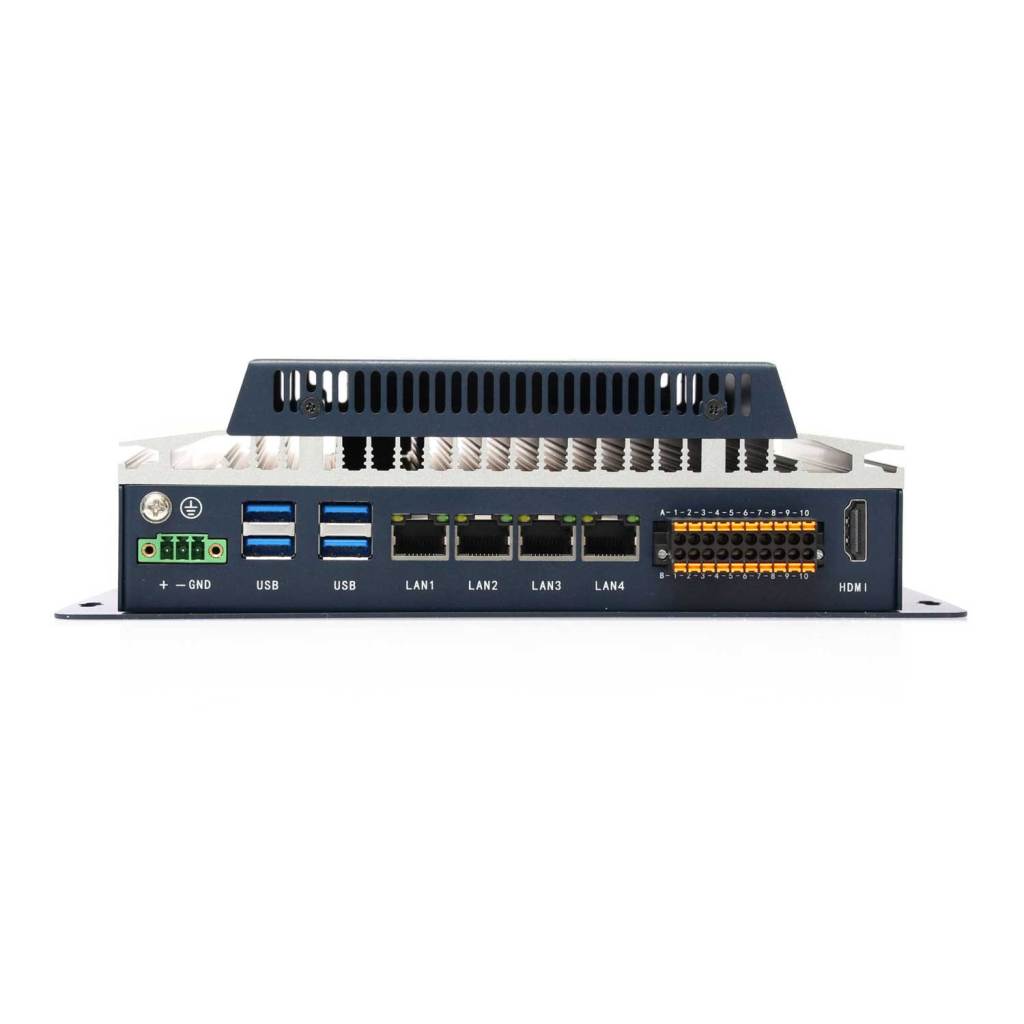
The EA-N500 is an industrial AI computing platform based on NVIDIA Jetson Orin NX/Nano modules.
Depending on the module configuration, the platform supports up to 157 TOPS of AI performance and uses NVIDIA’s Ampere GPU architecture.
It supports the NVIDIA software ecosystem, including:
- JetPack
- CUDA
- TensorRT
- cuDNN
For industrial applications, the EA-N500 also provides:
- 4 × PoE Gigabit Ethernet
- 4 × USB 3.0
- CAN
- GPIO
- RS-232/RS-485 options
- 9–36V DC input
- M.2 NVMe
- Optional Wi-Fi and 4G/5G
The compact 229 × 160 × 64.5 mm enclosure can be wall- or VESA-mounted.
Why Jetson makes sense for edge AI
For machine vision or AI inference, the GPU is only part of the system.
The system also needs to connect cameras, communicate with PLCs, process sensor data, and operate reliably at the edge.
For example:
Industrial cameras → PoE → Industrial AI PC → AI inference → PLC / control system
This is where an embedded GPU industrial PC can be more practical than installing a large GPU workstation next to the production line.
3. Discrete GPU Industrial PC
Best for:
- High-performance machine vision
- Multiple cameras
- Complex AI workloads
- GPU-accelerated industrial software
- Large image-processing workloads
- Applications requiring PCIe expansion
A discrete GPU architecture uses a dedicated graphics card or GPU accelerator installed through a PCIe expansion slot.
This architecture provides greater flexibility when the application requires a specific GPU, additional GPU memory, or more substantial GPU computing capability.
CESIPC Example: IPC-627

The IPC-627 is a 2U industrial PC platform designed for applications requiring industrial computing and expansion capability.
Its architecture supports ATX industrial motherboards and provides multiple expansion slots, including:
- 1 × PCIe x16
- 2 × PCIe x1
- 2 × PCI
- Multiple drive bays
The PCIe x16 slot can accommodate supported low-profile graphics cards or GPU accelerators.
This makes the IPC-627 suitable when GPU computing needs to be combined with industrial expansion cards, motion-control cards, data-acquisition hardware, or other PCIe devices.
When should you choose a discrete GPU?
A discrete GPU becomes more attractive when the application requires:
- Higher GPU computing performance
- A specific NVIDIA or other supported GPU
- More GPU memory
- Multiple expansion cards
- A future GPU replacement or upgrade path
- Combination of GPU acceleration and industrial PCIe I/O
The key consideration is not simply GPU performance. The complete system must also meet requirements for power supply, cooling, mechanical clearance, PCIe compatibility, and long-term industrial operation.
Integrated vs. Embedded vs. Discrete GPU
| Architecture | Typical Workload | Main Advantage | Typical Application |
|---|---|---|---|
| Integrated Graphics | HMI, SCADA, visualization | Compact and simple | Machine control |
| Embedded GPU | AI inference, machine vision | AI performance in a compact system | Edge AI |
| Discrete GPU | Heavy AI/vision workloads | GPU flexibility and expansion | High-performance vision |
A useful rule is:
Integrated graphics → visualization
Embedded GPU → edge AI
Discrete GPU → high-performance GPU workloads
There are exceptions, but this provides a practical starting point for system selection.
Jetson vs. Discrete GPU: Which Is Better?
Neither architecture is universally better.
The choice depends on the application.
| Requirement | Jetson / Embedded GPU | Discrete GPU |
|---|---|---|
| Compact size | Excellent | Depends on chassis/GPU |
| Low-power edge AI | Excellent | Depends on GPU |
| AI inference | Excellent | Excellent |
| Large GPU workloads | Limited by module | Generally better |
| GPU selection | Module-based | Wide selection |
| PCIe expansion | Limited | Strong |
| Multi-card expansion | Limited | More flexible |
| Industrial vision | Excellent | Excellent |
| System customization | High | Very high |
For a compact machine vision or edge AI device, an embedded Jetson platform can be a strong fit.
For a larger industrial vision system requiring a specific GPU and several PCIe cards, a discrete GPU platform is generally more appropriate.
6 Things to Check Before Choosing an Industrial PC with GPU
1. GPU workload
Start with the software rather than the GPU model.
Ask:
- Is the workload AI inference?
- Image processing?
- 3D visualization?
- Video analytics?
- GPU-accelerated simulation?
- Simple display output?
If the application only needs to display an HMI interface, a dedicated GPU may be unnecessary.
2. Camera quantity and interface
Machine vision applications often have multiple cameras.
Check:
- Number of cameras
- Camera resolution
- Frame rate
- Camera interface
- PoE requirements
- Image-processing workload
For example, an industrial AI PC with multiple PoE ports can simplify camera connectivity at the edge.
3. AI framework and software compatibility
For AI applications, hardware compatibility is only one part of the selection process.
Check whether the platform supports your:
- AI framework
- Inference engine
- CUDA requirements
- TensorRT requirements
- Operating system
- Camera SDK
- Industrial communication software
For example, the EA-N500 is designed around the NVIDIA Jetson software ecosystem, which can be important when an existing AI application already depends on CUDA or TensorRT.
4. Power and thermal requirements
A GPU increases system power consumption and heat generation.
Check:
- Input voltage
- Total system power
- GPU power consumption
- Operating temperature
- Cooling method
- Available airflow
- Installation environment
A high-performance GPU may be attractive on paper but unnecessary if the machine has a limited power budget or restricted cooling space.
5. Industrial I/O and expansion
The GPU should not be selected independently from the rest of the system.
Check whether you also need:
- RS-232 / RS-485
- Ethernet
- PoE
- USB
- CAN
- GPIO
- PCIe
- Digital I/O
- Storage expansion
For industrial applications, these interfaces can be just as important as GPU performance.
6. Mechanical installation
Finally, check whether the complete system can actually fit into the machine.
Consider:
- Chassis dimensions
- GPU dimensions
- PCIe slot type
- Low-profile or full-height card
- Wall mounting
- Rack mounting
- VESA mounting
- Cable clearance
- Maintenance access
For example, the IPC-627 provides a larger 2U platform for applications where PCIe expansion and GPU installation are important.
Industrial Applications for GPU Computing
Machine Vision
Machine vision is one of the most common reasons to add GPU computing to an industrial system.
Typical applications include:
- Defect detection
- Product inspection
- OCR
- Object detection
- Classification
- Measurement
- Multi-camera inspection
The appropriate architecture depends on the number of cameras and AI workload.
A compact system may use an embedded GPU such as the EA-N500, while a more demanding inspection system may require a discrete GPU platform.
Edge AI and Video Analytics
Industrial facilities increasingly process data locally instead of sending every camera stream to a remote server.
An industrial PC with GPU can perform AI inference directly at the production line.
Typical applications include:
- Worker detection
- Object tracking
- Equipment monitoring
- Safety monitoring
- Production analytics
The advantage is that processing happens close to the data source, reducing the need to continuously transfer raw video to a central server.
Robotics
Robotic systems can combine GPU computing with:
- Machine vision
- Object recognition
- Robot guidance
- Sensor processing
- AI inference
For compact robotic systems, an embedded GPU platform can provide a useful balance between computing capability, physical size, and power consumption.
For larger robotic systems requiring several expansion cards or a higher-performance GPU, a PCIe-based industrial PC may be more appropriate.
How to Choose the Right Industrial PC with GPU
A practical selection process is:
Step 1 — Define the workload
Determine whether you need:
Visualization → AI inference → Heavy GPU computing
Step 2 — Determine the GPU architecture
- Integrated graphics
- Embedded GPU
- Discrete GPU
Step 3 — Check the software
Confirm GPU, OS, framework, SDK, and inference-engine compatibility.
Step 4 — Define industrial I/O
List the required:
LAN / PoE / USB / RS-232 / RS-485 / CAN / GPIO / PCIe
Step 5 — Calculate power and thermal requirements
Check the complete system rather than the GPU alone.
Step 6 — Confirm mechanical requirements
Verify chassis dimensions, mounting method, GPU dimensions, and expansion-slot requirements.
Step 7 — Plan for deployment
For industrial equipment, also consider:
- Long-term availability
- Maintenance
- Environmental conditions
- Power-loss behavior
- Storage
- Remote management
- Future expansion
Why the Most Powerful GPU Is Not Always the Best Choice
A common mistake is to select an industrial PC based only on GPU performance.
A production machine may have strict limits on:
- Available power
- Installation space
- Cooling
- Operating temperature
- PCIe expansion
- Industrial I/O
For example, a compact edge-AI machine may work better with a Jetson-based industrial PC than with a large discrete GPU system.
Conversely, a machine vision system processing several high-resolution camera streams may benefit from a discrete GPU and a larger PCIe industrial PC.
The right GPU architecture is the one that matches the complete industrial system.
Industrial PC with GPU: Quick Selection Guide
| If your application needs… | Consider |
|---|---|
| HMI / SCADA / industrial visualization | EPC-10XA |
| Compact edge AI | EA-N500 |
| Machine vision with AI inference | EA-N500 or IPC-627 |
| Multiple cameras | EA-N500 or discrete GPU platform |
| High GPU computing performance | IPC-627 + supported GPU |
| Multiple PCIe expansion cards | IPC-627 |
| Simple graphics output | Integrated graphics industrial PC |
Frequently Asked Questions
1. What is an industrial PC with GPU?
An industrial PC with GPU is an industrial computer equipped with graphics-processing capability for applications such as machine vision, AI inference, video analytics, robotics, or industrial visualization. The GPU can be integrated into the processor, embedded in an edge-AI platform, or provided by a discrete PCIe graphics card.
2. Does every industrial PC need a dedicated GPU?
No. HMI, SCADA, machine control, and many visualization applications can use processor-integrated graphics. A dedicated GPU becomes more relevant when the application requires substantial parallel computing, AI inference, or advanced image processing.
3. What is the difference between integrated, embedded, and discrete GPU architectures?
Integrated graphics are built into the processor and are suitable for basic graphics and visualization. Embedded GPU platforms such as NVIDIA Jetson provide dedicated GPU computing in a compact edge system. Discrete GPU systems use a separate graphics card or accelerator, providing greater GPU selection and PCIe expansion flexibility.
4. When should I choose NVIDIA Jetson instead of a discrete GPU?
Choose a Jetson-based industrial PC when you need compact edge AI computing, relatively low system size and power consumption, and compatibility with the NVIDIA Jetson software ecosystem. A discrete GPU is generally more suitable when you need a specific high-performance GPU, more GPU memory, or extensive PCIe expansion.
5. Can an industrial PC with GPU support multi-camera machine vision?
Yes, depending on the GPU, camera interfaces, number of cameras, resolution, frame rate, and software workload. The complete system should be evaluated rather than selecting the GPU based on model name alone.
6. How do I choose the right industrial PC with GPU?
Start with the workload, then determine the GPU architecture, software requirements, camera interfaces, industrial I/O, power and thermal requirements, expansion slots, and mechanical installation constraints.
7. Can a discrete GPU be installed in an industrial PC?
Yes, if the industrial PC provides a compatible PCIe slot, power supply, cooling capacity, and sufficient physical clearance. For example, the IPC-627 provides a PCIe x16 expansion slot designed to support compatible low-profile graphics cards or GPU accelerators.
8. What is more important: GPU performance or industrial I/O?
Both matter, but the priority depends on the application. A GPU-intensive vision system may prioritize GPU performance, while a machine-control system may place greater importance on serial ports, GPIO, Ethernet, PCIe expansion, and long-term industrial reliability.
Related CESIPC GPU Computing Solutions
- EPC-10XA — Compact fanless industrial PC with processor-integrated graphics
- EA-N500 — NVIDIA Jetson Orin NX/Nano industrial AI computing platform
- IPC-627 — 2U industrial PC platform with PCIe expansion for supported discrete GPUs
If you are selecting an industrial PC for machine vision, edge AI, robotics, or GPU-accelerated industrial computing, CESIPC can help match the computing architecture, I/O, expansion, and mechanical requirements to the application.
Need help choosing between integrated graphics, Jetson, and discrete GPU? Contact CESIPC with your application requirements and we can recommend a suitable platform.


We use your details only to answer this enquiry — no newsletters, no sharing. Drawings or a photo of the existing panel can be sent to sales@cesipc.com.