
Who the EPC-307A configuration is for
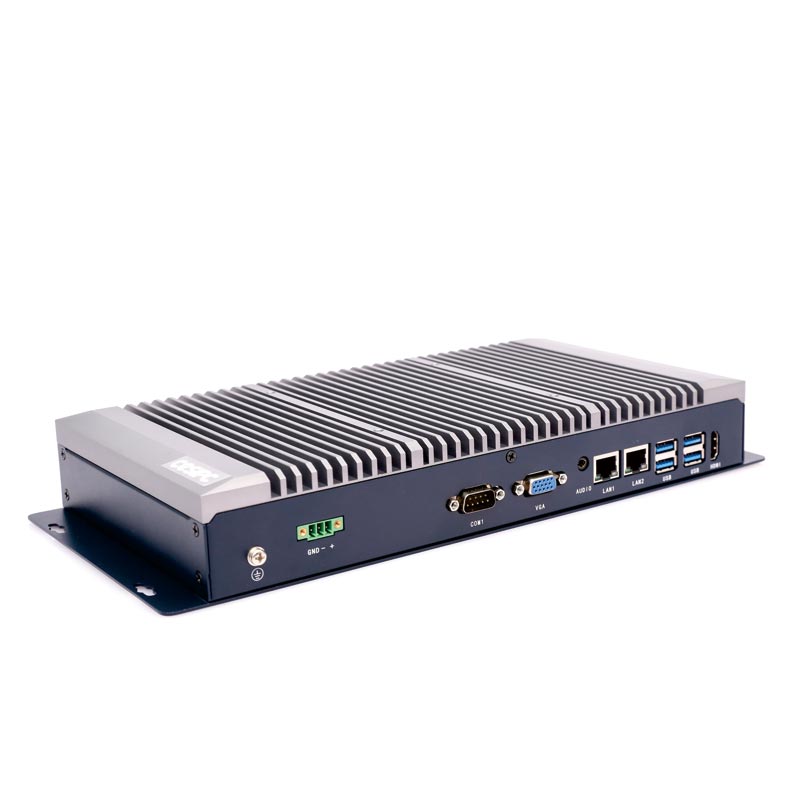
The EPC-307A is the second Celeron configuration of CESIPC’s EPC-30XA fanless embedded industrial PC. It runs an Intel Celeron J6412 quad-core processor (2.0–2.6 GHz, 10 W TDP) — two generations newer than the J1900 — with 8 GB of DDR4 memory expandable to 16 GB and a 128 GB SSD, in the same 337 × 160 × 47.5 mm chassis as the rest of the series.
Choose it over the EPC-306A when a serial concentrator also has to hold data locally: 16 GB of DDR4 instead of 8 GB of DDR3L, and a newer, longer-lifecycle platform. That is the headroom needed for an on-box buffer, a small historian or a protocol-gateway stack running alongside six live serial links.
It keeps all six DB9 ports — four RS-232 and two RS-485 — and adds a second USB 3.0 port, so commissioning reads from a fast USB stick or an external SSD do not compete with the four USB 2.0 ports used by the machine’s own peripherals.
Specify the EPC-307A when you want a modern, long-lifecycle Celeron board in a high-serial-count box, but the workload still does not justify a Core i3, i5 or i7. If the unit will run in-box databases, several SCADA clients or vision, move up to the EPC-309A or EPC-302A — the chassis and mounting stay the same.
One caveat: only the J1900 board in the EPC-306A carries Windows 7 support. The J6412 ships with Windows 10, Windows 11 or Ubuntu 16.04–22.04, so check any legacy serial configuration tool before standardising on this configuration.
Choose the right EPC-30XA configuration
All four configurations share the same 337 × 160 × 47.5 mm extruded aluminium chassis, the same mounting bracket and VESA pattern, the same 327 × 100 mm installation footprint, the same 6× DB9 serial (RS-232 ×4 + RS-485 ×2) and the same 2× Intel I210 Gigabit LAN. Only the compute board, memory, storage, USB mix and integrated graphics change.
| EPC-306A | EPC-307Acurrent | EPC-309A | EPC-302A | |
|---|---|---|---|---|
| Processor | Intel Celeron J1900, 4 cores, 2.0–2.4 GHz, 10 W | Intel Celeron J6412, 4 cores, 2.0–2.6 GHz, 10 W | Intel Core i3-10110U / i5-10210U / i7-10510U, 15 W | Intel Core i3-1215U / i5-1235U / i7-1250U |
| Memory | DDR3L 4–8 GB | DDR4 4–16 GB | DDR4 4–32 GB | DDR5 8–32 GB |
| Standard memory | 4 GB DDR3L (8 GB max) | 8 GB DDR4 (16 GB max) | 8 GB DDR4 (32 GB max) | 8 GB DDR5 (32 GB max) |
| Standard storage | 1× mSATA SSD, 128 GB standard | 1× mSATA SSD, 128 GB standard | 1× mSATA + 1× M.2 SSD, 128 GB standard | 2× M.2 SSD, 256 GB standard |
| USB ports | 5 × USB 2.0 + 1 × USB 3.0 | 4 × USB 2.0 + 2 × USB 3.0 | 2 × USB 2.0 + 4 × USB 3.0 | 2 × USB 2.0 + 4 × USB 3.0 |
| Graphics | Intel HD | Intel UHD | Intel UHD | Intel UHD (i3-1215U) / Iris Xe (i5, i7) |
| Windows 7 support | Yes | Not listed | Not listed | Not listed |
| Best for | Lowest-cost serial concentrators with six DB9 ports and several USB 2.0 devices | Newer Celeron board with six serial ports and more memory headroom | Six-port serial concentrators that also run databases or several SCADA clients | Six serial ports plus GPU-accelerated vision or edge inference |


HIGHLIGHTS:
- Intel® Celeron J6412 quad-core, 2.0–2.6 GHz, 10 W, 1.5 MB cache
- 8 GB DDR4 (16 GB maximum) · 1× mSATA SSD, 128 GB standard
- 6× DB9 serial: RS-232 ×4, RS-485 ×2
- 0°C to 50°C (-40°C to 70°C optional)
- Dual Intel® I210 Gigabit LAN
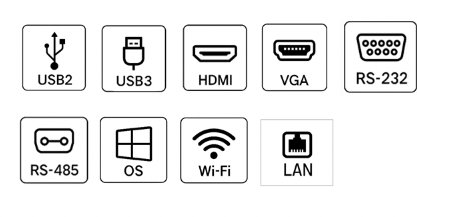
- 6× USB: USB 2.0 ×4, USB 3.0 ×2
- HDMI + VGA dual display, 3.5 mm audio
- 12V DC standard, 9–36V DC optional
- TPM 2.0, SafeCore™ power-loss protection
- OS: Windows 10/11, Ubuntu 16.04–22.04
- Fanless design, CESIPC BlockCore architecture
- 6063 high-strength aluminium chassis, 2.11 kg
- Bracket mount + VESA mount, 327 × 100 mm installation
- 60,000-hour MTBF, CE / FCC
- 24/7 non-stop operation
TARGET APPLICATIONS:
Designed for demanding industrial environments where reliability, compact footprint, and flexible connectivity are non-negotiable.

CNC / Motion Control, Machine Vision, Factory Automation, Semiconductor, AGV / Robotics, Energy Monitoring, Digital Signage, Edge AI Inference
CESIPC ADVANTAGE:
16-year manufacturing heritage with in-house sheet-metal and SMT production lines, ensuring quality consistency from prototype to mass production.

ODM services available: BIOS customization, boot logo, OEM labeling, and full white-label support.
FAQ
Answers for the EPC-307A build. Platform-wide questions — chassis, protection, mounting and the upgrade path — are answered on the EPC-30XA overview page.
What CPU, memory and storage does the EPC-307A ship with?
The EPC-307A ships with an Intel Celeron J6412 quad-core processor at 2.0–2.6 GHz with 1.5 MB of cache and a 10 W TDP, 8 GB of DDR4 memory expandable to 16 GB, and a 128 GB SSD. Integrated Intel UHD graphics drive the HDMI and VGA outputs. Other memory and SSD sizes are available as factory builds.
How many serial ports does the EPC-307A have, and what type?
Six DB9 ports in total: four RS-232 and two RS-485. That combination covers a mixed machine — RS-485 for a multi-drop Modbus RTU bus and four point-to-point RS-232 links for weighing indicators, barcode readers, temperature controllers or PLC programming ports. The EPC-30XA chassis is 337 mm wide specifically to fit all six without an expansion card.
Does the EPC-307A support Windows 7?
No. CESIPC lists Windows 7 support only for the Celeron J1900 board in the EPC-306A. The EPC-307A with its Celeron J6412 ships with Windows 10, Windows 11 or Linux Ubuntu 16.04, 18.04, 20.04 and 22.04, so a machine runtime that requires Windows 7 should stay on the EPC-306A.
Can the EPC-307A act as a serial concentrator and a protocol gateway at once?
Yes, within limits. 8 GB of DDR4 expandable to 16 GB and a 128 GB SSD are enough to run a Modbus or OPC UA gateway across all six serial links while buffering data locally. For a larger database, several SCADA clients or on-box analytics, specify the EPC-309A with up to 32 GB DDR4 or the EPC-302A with DDR5 — the chassis and the six-port layout do not change.
Contact Us
Talk to a CESIPC Engineer
Our application engineers are ready to help you select the right configuration, discuss ODM requirements, or provide a tailored quotation for your project.
Typical response within 24 hours · Multilingual support · CE / FCC / BIS compliant