
Last updated: November 11, 2026 · Reviewed by the CESIPC Engineering Team

Quick answer: An industrial PC for high-temperature environments is a sealed computer whose thermal design still holds when the air around it is 40-50 °C and full of lint. Surviving that is decided by processor base power, cabinet air temperature, heat-sink area and how the cooling path is cleaned — not by the model name.
Textile control cabinets are the case where those four numbers stop agreeing. A stenter frame or a dryer runs 24 hours a day with the cabinet sitting metres from the heat source, and the production team cannot stop the line to re-seat a cable or swap a fan. This analysis walks through what happens to a 65 W desktop processor inside such a cabinet, what a 15 W platform changes, and which numbers to measure before ordering.
Why 40-50 °C on the Factory Floor Is Not the Number You Need
Measure inside the cabinet, at the air inlet of the computer, over a full production day. The temperature quoted around a stenter frame is room air. The number that decides whether the computer lives is the air that reaches its heat sink, which is warmer than the room for three separate reasons.
The Cabinet Is a Box Inside a Hot Room
A cabinet with its own air conditioner is better than a sealed box, but it is not a cold room. The enclosure absorbs radiant heat from the machine, the door is opened for maintenance, and the conditioner is sized for average load rather than for the hour when the plant is at full production. Cabinet air is commonly several degrees above room air, and the gap widens exactly when the line is busiest.
Lint Turns a Heat Sink Into an Insulator
Fabric fly and cotton dust do not only block fans. They settle between the fins of a passive heat sink and form a mat that insulates the aluminium from the air it is supposed to exchange heat with. A heat sink that is clean on the outside can be blind on the inside by the end of a season, and the failure looks like an electronics fault rather than a housekeeping one.
Black Screens That Clear When the Cable Is Re-Seated
Heat rarely announces itself. What the line reports is a screen that goes black and comes back after someone re-plugs the display cable. That symptom has two different chains behind it: a display link that has lost contact, or a supply that has dropped out. The first question to ask is whether the computer kept running while the screen was black. If the host stayed up, the fault is in the cable, connector or display path; if the whole unit restarted, it is in the power path. Heat makes both more likely, because it hardens cable insulation, relaxes terminal pressure and pushes connectors in and out of tolerance.
What 65 W Actually Means Inside a Sealed Aluminium Box
Base processor power is heat that must leave the enclosure continuously, not a peak figure. The 9th-generation desktop part common in stenter control cabinets is specified at 65 W; the 12th-generation part in the EPC-102B 12th Gen build is specified at 15 W base power with up to 55 W maximum turbo power. In a sealed box the difference is not a datasheet detail — it is the size of the heat sink, the temperature margin and whether a fan is needed at all.
A 65 W part can be cooled passively. That is an engineering achievement, not a contradiction, and it is what the current generation of closed box PCs does with copper heat pipes and a thick aluminium body. But passive cooling at 65 W inside a 40-50 °C cabinet leaves very little margin, so any of the three effects above — hotter cabinet air, an insulated heat sink, a blocked vent — is enough to use it up. That is the point where integrators start adding an external fan, and where the design starts depending on maintenance instead of on physics. That margin, not the presence of a heat sink, is what separates an industrial PC for high-temperature environments from a sealed box that happens to be made of aluminium.
The Four Numbers That Decide Whether a Box PC Survives a Textile Cabinet
One of these numbers is measured on site; the other three come from the datasheet. Write all four into the specification before comparing products, because a vendor that cannot answer them is being compared on price alone.
| Number | What it is | Why it decides the outcome |
|---|---|---|
| 1. Cabinet air temperature at the computer inlet | Measured with a logger for at least 24 hours at full production, in the season the plant runs hottest | This is the ambient the datasheet rating is written against. Room temperature is not a substitute. |
| 2. Processor base power | The sustained figure, for example 65 W or 15 W, not the turbo number | It sets how much heat the enclosure has to remove every second, at every duty point. |
| 3. Heat-sink area and fan-assist threshold | Enclosure dimensions, material, and the load or ambient point where fan assist starts | It sets the margin between normal operation and the moment the design asks for help. |
| 4. Cleaning and service interval for the cooling path | How lint is kept out, and how the fan is replaced when it finally fails | In a textile plant this is the number that actually decides the service life. |
Why a Bolted-On Fan Fails Where Fan Assist Does Not
An external fan bolted to a heat sink runs all the time, in the dirtiest air in the plant, with no threshold and no service plan. It is a reasonable emergency measure and a poor long-term design for three reasons.
| Aspect | Fan bolted onto the heat sink | Temperature-controlled fan assist |
|---|---|---|
| When it runs | Always, as soon as power is applied | Only when load or ambient approaches the thermal threshold |
| What it pulls in | Lint and dust continuously, unfiltered | Air only during the periods the design needs it |
| Normal operation | Air path across the enclosure at all times | Sealed and passive; no filter, no daily dust path |
| Failure handling | Threaded fasteners, cabling, on-site improvisation | Fan module replaced in the field |
| Warranty and traceability | Usually undocumented and outside the enclosure design | Part of the published thermal design |
The comparison is not about whether fans are bad. It is about whether airflow is a controlled part of the thermal design or an addition to it. On the CESIPC EPC-102B the fan sits in the top cover as a field-replaceable stage: the box runs passively under normal load, and the intelligent thermal control system brings the fan in automatically when processor load or ambient temperature approaches the threshold.
What 15 W Buys You: 12th Gen U-Series Against a 65 W Desktop Part
Moving from a 65 W desktop processor to a 15 W 12th Gen part removes most of the thermal problem instead of managing it. The two processors are compared below on the figures Intel publishes, which is the only comparison that can be audited.
| Specification | Intel® Core™ i7-9700 | Intel® Core™ i7-1255U |
|---|---|---|
| Generation and socket | 9th Gen, LGA1151 desktop | 12th Gen, BGA mobile |
| Cores and threads | 8 cores / 8 threads | 10 cores / 12 threads |
| Processor base power | 65 W | 15 W |
| Maximum turbo power | Not applicable (65 W TDP) | Up to 55 W |
| Max turbo frequency | Up to 4.70 GHz | Up to 4.70 GHz |
| Intel Smart Cache | 12 MB | 12 MB |
| Source | Intel ARK i7-9700 | Intel ARK i7-1255U |
Two things follow. First, the sustained heat load drops by roughly a factor of four, which is the difference between a sealed box that needs help on a hot afternoon and one that does not. Second, the 12th Gen platform brings DDR5 memory on the EPC-102B 12th Gen builds, so the memory bandwidth per watt also rises. Turbo power still peaks at 55 W for short bursts, which is exactly why the fan-assist threshold has to be part of the configuration rather than an afterthought.
How Intelligent Fan Assist Works: From Cabinet Temperature to Fan On
The sequence is short, and every step can be specified before the order is placed. This is the five-step path CESIPC follows when a textile control cabinet is being configured.
Step 1 — Measure the cabinet, not the room. Log air temperature at the planned inlet position for a full production day, then add the summer worst case.
Step 2 — Fix the processor platform against that ambient. Choose base power first and core count second, so the thermal margin exists before the software is ported.
Step 3 — Set where fan assist begins. Define the load or ambient threshold at which the fan stage engages, so the box stays passive in normal duty.
Step 4 — Keep the sealed path sealed. Leave the enclosure closed in normal operation, so lint has no continuous air path to follow across the boards.
Step 5 — Plan the fan as a service item. Treat the fan module as a field-replaceable part with an inspection interval, not as a permanent fixture.
Four Gigabit Segments, Because Vision and Production Networks Stay Apart
The port count on a stenter cabinet is set by the cameras, not by the office network. A print or inspection station typically wants its camera network kept away from the production network, which is why multi-port industrial PCs appear in these cabinets in the first place. The EPC-102B carries four Intel I210 Gigabit ports, with PoE on LAN1 and LAN2, so production, management, camera and uplink segments can be kept separate without adding a second switch inside a cabinet that has no room for one.
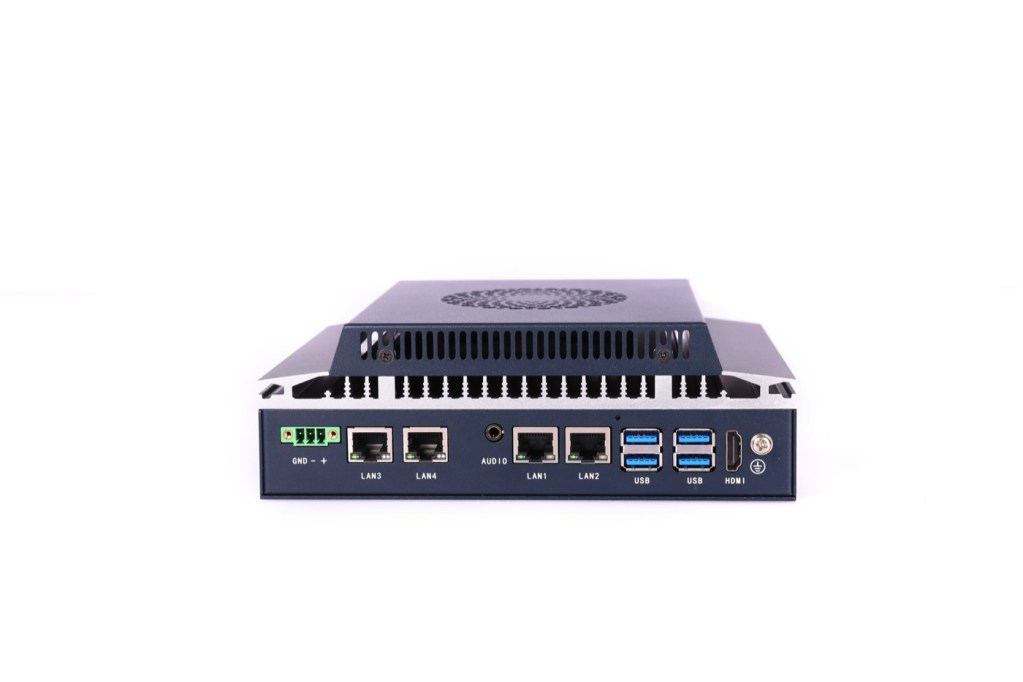
When the machine needs more segments than four, the honest answer is a switch or a different platform rather than a promise. The industrial PC with PoE range covers camera-heavy configurations, and the industrial PC for machine vision guide covers the selection logic for frame rate, jumbo frames and PoE budget.
EPC-102B Configuration for a Textile Control Cabinet
This table is the configuration discussion in one page: what the cabinet asks for, and what the datasheet answers. Every CESIPC value below is taken from the published EPC-102B specification.
| Requirement in the cabinet | CESIPC EPC-102B specification |
|---|---|
| Sustained 40-50 °C cabinet air | Operating temperature 0-50 °C; wide-temperature option −40 to 70 °C |
| Heat without a continuously running fan | Fanless passive operation plus automatic fan assist under load |
| Fan that can be serviced on site | Intelligent thermal control with a hot-swappable fan |
| Sealed against lint in normal duty | Closed aluminium chassis, no filter and no daily dust path while passive |
| Separate camera and production networks | 4 × Intel I210 Gigabit LAN, LAN1 and LAN2 with PoE |
| Camera power without an extra switch | PoE on LAN1 and LAN2 |
| Serial devices on the machine | Serial configured through BlockCore® function cards (RS-232 / RS-422 / RS-485) |
| Plant DC supply, not a wall adapter | 9-36 V DC wide-range input on a three-pin terminal block |
| Unattended restart after power loss | AT (auto power-on) or ATX (soft power) boot mode |
| Memory and storage headroom | DDR5 4-32 GB on 12th Gen builds; 1 × mSATA SSD |
| Space inside the cabinet | 337 × 160 × 47.5 mm, 2 kg, aluminium chassis, wall or VESA mount |
| Certification for machine export | CE / FCC / BIS to EN 55032 and EN 55035; ODM and OEM BIOS branding available |
Specification note: All CESIPC specifications quoted on this page come from the published EPC-102B product page as read on November 11, 2026. Values vary by configuration: the standard build ships with a 12th Gen i3-1215U, and the i5-1235U and i7-1255U are options; the wide-temperature range of −40 to 70 °C is an option rather than standard; PoE, serial ports and wireless are configuration items, not defaults on every part number; fan MTBF, airflow and filter specification are not published by CESIPC. Processor figures are quoted from Intel ARK. Where a value is not published, this page states that it is not published rather than estimating it. Confirm the current datasheet with CESIPC before specifying.
Where This Configuration Does Not Fit
A 15 W fan-assisted box is not the answer to every high-temperature environment. It is worth saying where it stops being the right choice.
If the cabinet air stays above 50 °C for long periods, the standard rating is exceeded and the wide-temperature option has to be quoted and verified on site rather than assumed. If the machine needs more than four network segments, a managed switch or a different platform is the honest answer. If the application needs a discrete GPU for in-line inspection, the thermal budget changes completely and belongs on a different page. And if the real problem is a display that intermittently goes black, the first step is still to find out whether the host stayed up — a new computer will not fix a cable.
Author Information
CESIPC Marketing Team (Industrial Computing & Custom I/O Specialists). This article is written and reviewed by the CESIPC marketing team, which includes specialists in fanless industrial computing, modular I/O and BlockCore™ interface design, panel PC integration, machine vision platforms and industrial project delivery. Product specifications are based on official CESIPC datasheets. Where a specification is not publicly documented, this article states so instead of estimating a value. Reviewed by the CESIPC Engineering Team.
Related CESIPC Solutions
- CESIPC EPC-102B industrial box PC — four Intel I210 LAN ports, intelligent thermal control and BlockCore function cards.
- Industrial panel PC for dyeing and finishing equipment — the display side of the same textile cabinet.
- Why choose a fanless IPC — what passive cooling does and does not solve.
If the cabinet already has an air conditioner and a temperature log, send both with the port list and the mounting dimensions — that is enough to size the platform without a site visit.
Common Questions About Industrial PCs in High-Temperature Textile Cabinets
What is an industrial PC for high-temperature environments?
It is a sealed industrial computer whose thermal design still holds when the air around it is 40-50 °C and carries lint. Whether it holds is decided by processor base power, cabinet air temperature, heat-sink area and the cleaning interval for the cooling path.
What cabinet temperature can a fanless industrial PC really handle?
The published range is the only answer that can be audited. The CESIPC EPC-102B is rated 0-50 °C with a −40 to 70 °C wide-temperature option, so a cabinet measured above 50 °C needs the option quoted and verified on site.
Why does processor base power matter more than the CPU name?
Base power is the heat that must leave the enclosure continuously. A 65 W desktop part and a 15 W 12th Gen part can both reach 4.70 GHz, but the sustained heat load differs by roughly a factor of four, which decides whether passive cooling has margin.
Does the CESIPC EPC-102B use an external fan?
It uses temperature-controlled fan assist. The box runs passively fanless under normal load with no filter and no continuous air path, and the intelligent thermal control system engages the fan when processor load or ambient temperature approaches the threshold. The fan is hot-swappable.
Can an external fan make lint problems worse?
Yes, if it runs continuously in unfiltered air. A fan bolted to a heat sink pulls fabric fly across the enclosure at all times, and a mat of lint between the fins insulates the heat sink from the air it is meant to exchange heat with.
How should I measure the temperature inside a textile control cabinet?
Place a logger at the planned computer inlet position and record for a full production day, in the hottest season, at maximum line speed. Room temperature is not a substitute, because cabinet air runs hotter and the gap widens at full load.
How many Gigabit LAN ports does the CESIPC EPC-102B provide?
Four Intel I210 Gigabit ports, with PoE on LAN1 and LAN2. Production, management, camera and uplink segments can therefore stay separate without adding another managed switch inside a cabinet that has no room for one.
What is the operating temperature range of the CESIPC EPC-102B?
The published range is 0-50 °C as standard, with a −40 to 70 °C wide-temperature option. Storage range is −10 to 60 °C and humidity is 10-90% non-condensing. Fan MTBF and airflow figures are not published.
Does heat cause the black screens we see on the line?
Heat contributes but rarely explains them alone. A black screen that clears when the cable is re-seated is usually a display link or supply contact fault, and heat accelerates it by hardening insulation and relaxing terminal pressure. First check whether the host stayed running.
What should I prepare before contacting CESIPC about a textile line retrofit?
Prepare the cabinet air temperature log and its measurement position, the network segments and camera count, the serial or fieldbus device list, the space available inside the cabinet, the available DC supply voltage, the required certifications and the annual machine volume.
Request a quote for the EPC-102B
Send the cabinet air temperature log, the network segments you need, the serial or fieldbus devices on the machine, and the space available inside the cabinet. CESIPC will answer with a configuration and a lead time.
Open the EPC-102B product page
We use your details only to answer this enquiry — no newsletters, no sharing. Drawings or a photo of the existing panel can be sent to sales@cesipc.com.