



–Episode 11–


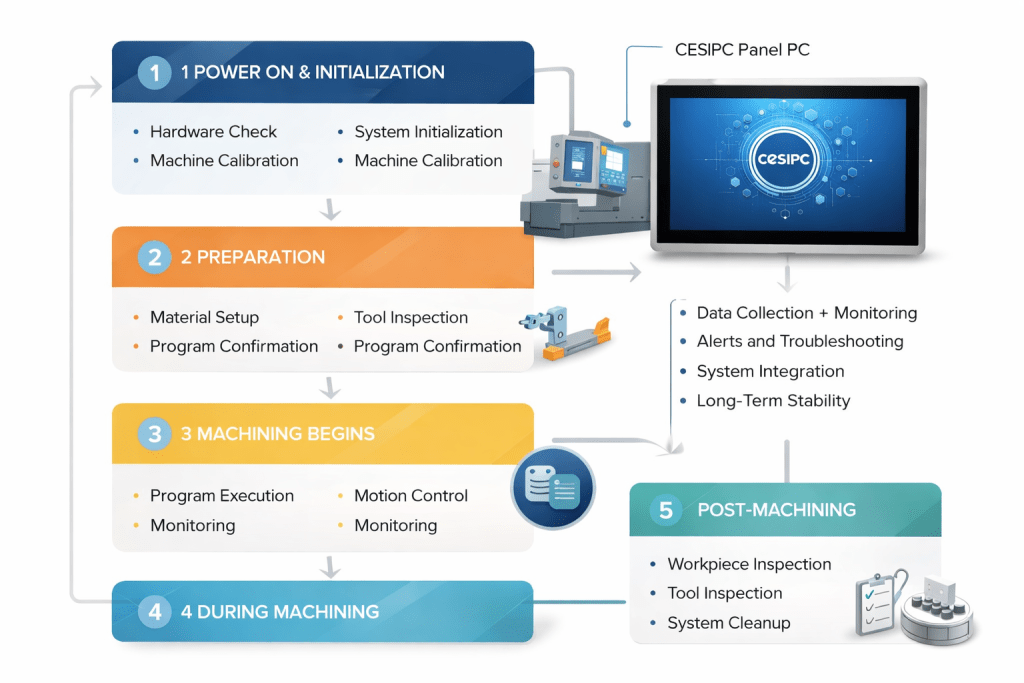
Today, I connected the dots on the entire workflow of a CNC machine. From turning on the power to starting the machining process, there’s more involved than simply pressing a button. Each step plays a vital role in ensuring the machine operates efficiently, accurately, and safely.
The key takeaway for today is this:
“Machine startup isn’t just about powering up—it’s about preparing for precision machining.”
1) Power On & Initialization: Not Just “Turning It On”
Starting a CNC machine isn’t as simple as pressing a power button. There’s a series of initialization checks that ensure all hardware and systems are ready for safe and accurate operation.
- Hardware Check: The machine performs a self-test, verifying components like the power system, servo motors, tool magazine, etc.
- System Initialization: The CNC controller loads necessary parameters and performs calibration steps, ensuring the system is prepared for further commands.
- Machine Calibration: The machine completes initial zeroing operations, calibrating the coordinate system and confirming the accuracy of sensors and servo systems.
Any issues during this phase could affect the accuracy and safety of the machining process.
2) Preparation: Material & Tool Checks
Before the machining process starts, proper setup is critical:
- Material Setup: The workpiece is secured in place to prevent any movement or distortion during the process.
- Tool Inspection: Tools are checked for proper selection, wear, and size, ensuring that the right tool is in place for the job.
- Program Confirmation: The CNC program is verified, confirming that the correct instructions are entered, the tool paths are accurate, and the proper tools are selected.
These preparatory steps are crucial to ensure that the machining process runs smoothly and produces precise results.
3) Machining Begins: The CNC, Servo, and Machine “Talk” to Each Other
Once the system is powered up and all preparations are confirmed, the CNC controller starts executing the machining program:
- Program Execution: The CNC controller reads the G-code and begins planning the tool paths.
- Motion Control: The servo system receives commands from the CNC controller and drives the machine’s movements, adjusting in real-time to ensure precision.
- Monitoring: The HMI (Human-Machine Interface) displays real-time data such as tool paths, axis positions, and spindle speed. It also provides feedback and alerts if any abnormalities arise during machining.
At this stage, the collaboration between the CNC system, servo drives, and the machine body ensures smooth and accurate machining. If there’s a deviation from the plan, the system quickly makes corrections.
4) During Machining: Data Collection and Real-Time Feedback
- Data Collection: The system continuously collects data from sensors, servos, and other monitoring equipment, keeping track of axis precision, feed rates, and cutting conditions.
- Real-Time Feedback: Based on the data, the CNC system adjusts in real-time to maintain accuracy and quality. For example, if a tool begins to wear, the system can issue a warning and make adjustments.
- Interruption and Pause: If a problem arises—such as tool breakage or a piece jamming—the CNC system will trigger safety mechanisms to pause or stop the process.
The HMI becomes critical during this phase, enabling operators to see all relevant information in one place and make adjustments quickly.
5) Post-Machining: Final Checks and Maintenance
Once machining is complete, the system performs several final steps:
- Workpiece Inspection: The finished workpiece is checked for quality and precision, typically using measurement tools or automated systems.
- Tool Inspection: Tools are inspected for wear and replaced if necessary to ensure they’re ready for the next operation.
- System Cleanup: The worktable, tools, and machine parts are cleaned and maintained, ensuring the machine is ready for the next production cycle.
The reliability of the CNC machine heavily depends on routine maintenance and tool checks to ensure the machine continues to function optimally.
6) Why an Industrial PC is Essential for CNC System Management
One critical component that I realized supports the entire CNC process is the Industrial PC, especially when used as the HMI (Human-Machine Interface).
While the CNC kernel handles real-time processing, the HMI, typically powered by an industrial PC like CESIPC, is what keeps the system operational and traceable. Here’s how:
- Data Collection and Monitoring: The HMI provides real-time visibility into the CNC’s performance, displaying critical data like axis positions, tool wear, spindle speeds, and much more.
- Alerts and Troubleshooting: The industrial PC tracks alarms and logs, enabling fast troubleshooting. If something goes wrong, the HMI shows operators the exact error, helping them respond quickly.
- System Integration: It connects with the CNC’s software and hardware components, ensuring seamless operation across the system.
- Long-Term Stability: Industrial PCs like CESIPC are built to operate 24/7 in challenging environments—handling oil mist, dust, EMI, and temperature fluctuations—while maintaining high reliability.
Thus, an industrial PC is not just a “display” device, but a central management platform that helps ensure the CNC system stays visible, manageable, and traceable.
Day 11 Wrap-Up (Notes to My Future Self)
- CNC startup involves multiple checks to ensure the machine is ready for precise machining
- Preparing the material, tools, and program is essential for a smooth process
- Real-time monitoring and feedback ensure precision and quality during machining
- The HMI, backed by a stable industrial PC, plays a crucial role in making the system usable, traceable, and manageable
- Regular maintenance and tool checks are necessary to ensure continued performance and stability
Contact CESIPC Team


